Feature Dynamic Theme Switcher
Allow users to switch between themes at runtime without reloading the page. The theme switcher automatically discovers available themes and persists user preferences.
- ✅ User Preference - Let users choose their preferred theme
- ✅ No Page Reload - Instant theme switching
- ✅ Auto-Discovery - Automatically finds all available themes
- ✅ Persistent - Remembers user choice
- ✅ Accessible - Better for light/dark mode preferences
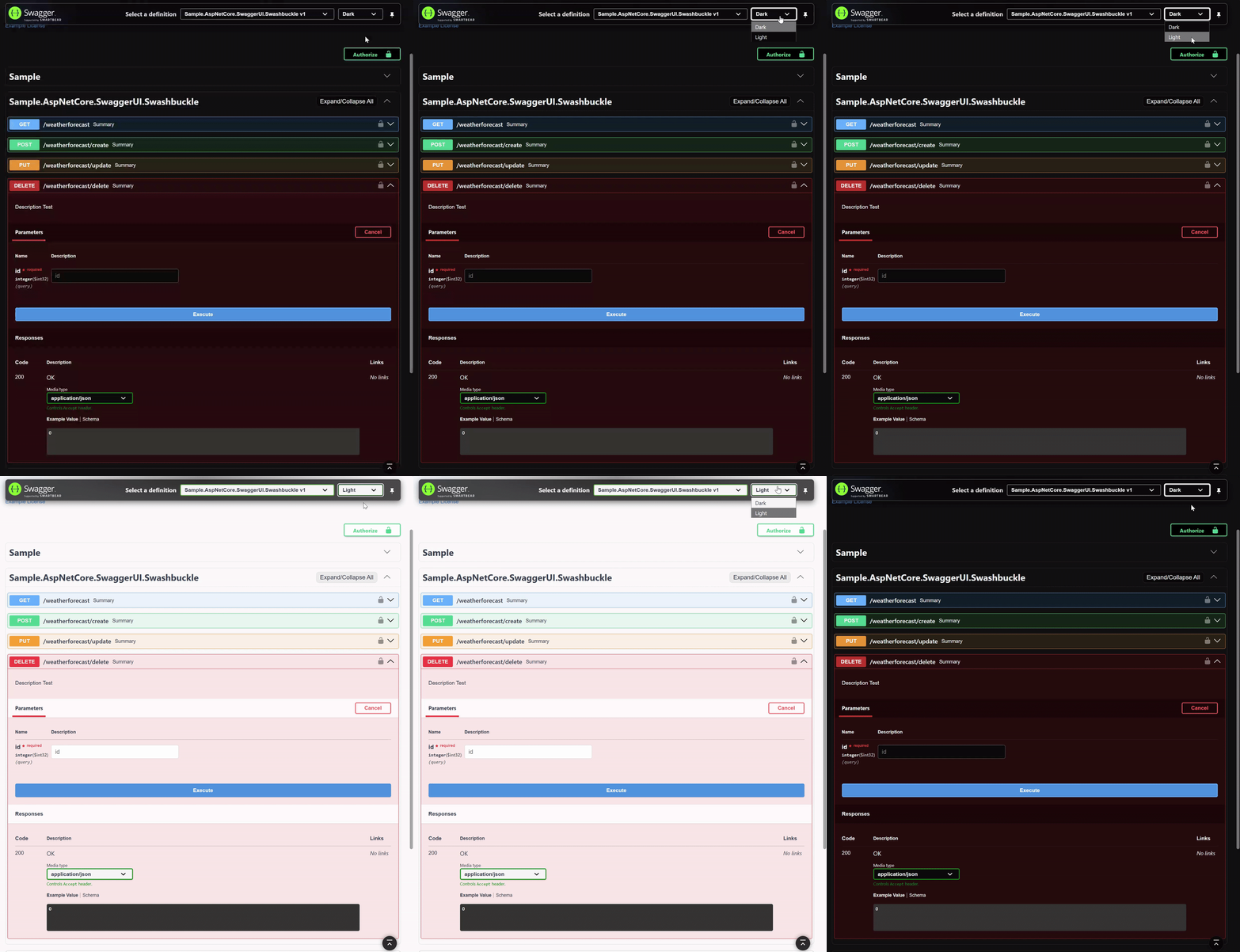
Configuration used in this example:
options.EnableAllAdvancedOptions(new ThemeSwitcherOptions()
    .WithThemes(Theme.Dark, Theme.Light)
.WithCustomThemes(CustomThemeMode.None));using AspNetCore.Swagger.Themes;
app.UseSwaggerUI(Theme.Dark, options =>
{
options.EnableThemeSwitcher();
});using AspNetCore.Swagger.Themes;
app.UseSwaggerUi(Theme.Dark, settings =>
{
settings.EnableThemeSwitcher();
});The theme switcher operates in three phases:
Automatically scans your assembly for available themes:
- All predefined themes (
Theme.Dark,Theme.Light, etc.) - Custom themes from
SwaggerThemesfolder (including nested folders) - Theme classes inheriting from
BaseThemewherever they are defined
Creates HTTP endpoints for each discovered theme:
/styles/dark.css/styles/light.css/styles/your-custom-theme.css-
/themes/metadata.json- List of all available themes
JavaScript dynamically loads the selected theme:
- Updates CSS link in document head
- Saves preference to localStorage
- Applies instantly without page reload
Shows all predefined and auto-discovered custom themes:
app.UseSwaggerUI(Theme.Dark, options =>
{
    options.EnableThemeSwitcher(); // All themes available
});Show only the built-in themes:
app.UseSwaggerUI(Theme.Dark, options =>
{
    options.EnableThemeSwitcher(ThemeSwitcherOptions.PredefinedOnly());
});Show only your custom themes:
app.UseSwaggerUI(CustomTheme.Corporate, options =>
{
    options.EnableThemeSwitcher(ThemeSwitcherOptions.CustomOnly());
});Choose exactly which themes to include:
app.UseSwaggerUI(Theme.Dark, options =>
{
    options.EnableThemeSwitcher(new ThemeSwitcherOptions()
        .WithThemes(
            Theme.Dark,
            Theme.Light,
            Theme.Forest,
            CompanyThemes.Corporate
        ));
});Combine multiple configuration options:
app.UseSwaggerUI(Theme.Dark, options =>
{
    options.EnableThemeSwitcher(new ThemeSwitcherOptions()
        .WithAllPredefinedThemes(true)
        .ExcludeThemes(Theme.Futuristic, Theme.Desert)
        .WithCustomThemes(CustomThemeMode.AutoDiscover));
});
Tip
Theme switcher options can also be passed to EnableAllAdvancedOptions() if you're enabling all features at once:
options.EnableAllAdvancedOptions(new ThemeSwitcherOptions()
.WithThemes(Theme.Dark, Theme.Light));The switcher automatically finds themes through different methods:
1. Theme Classes (Recommended) - Full auto-discovery
Theme Classes inheriting from BaseTheme are automatically discovered:
public class CompanyThemes : Theme
{
    protected CompanyThemes(string fileName) : base(fileName) { }

    public static CompanyThemes Corporate => new("corporate.css"); // ✅ Auto-discovered
    public static CompanyThemes Tech => new("tech.css");           // ✅ Auto-discovered
}
2. Embedded Files - Manual selection only
Embedded CSS files in SwaggerThemes folder are not auto-discovered. Only the explicitly selected theme will be available alongside predefined themes:
var assembly = Assembly.GetExecutingAssembly();

// Only "corporate.css" + predefined themes available in switcher
app.UseSwaggerUI(assembly, "corporate.css", options =>
{
    options.EnableThemeSwitcher();
});
Tip
For full auto-discovery of custom themes, use Theme Classes instead of Embedded Files.
3. Naming Convention File names are converted to display names:
-
corporate-blue.css→ "Corporate Blue" -
dark-mode.css→ "Dark Mode" -
myCustomTheme.css→ "My Custom Theme"
Customize how theme names are displayed:
app.UseSwaggerUI(Theme.Dark, options =>
{
    options.EnableThemeSwitcher(new ThemeSwitcherOptions()
        .WithDisplayFormat("🎨 {name}")); // "🎨 Dark", "🎨 Light", etc.
});The theme switcher requires:
- ✅ LocalStorage API - For persisting user preferences
- ✅ JavaScript enabled - For dynamic theme switching
- ✅ Modern browsers - Chrome 60+, Firefox 55+, Safari 11+, Edge 79+
Fallback: If JavaScript is disabled, the initial theme specified in UseSwaggerUI() is used.
- ✅ Lazy loading - Themes are loaded only when selected
- ✅ Cached - Browser caches theme CSS files
- ✅ Minified - Uses minified CSS (by default only for predefined themes)
For many themes:
- Use
WithThemes()to limit available options - Pre-load frequently used themes
- Use minified themes in production
For large applications:
- Enable browser caching headers
- Consider limiting the number of available themes
Check these common issues:
- JavaScript errors - Open browser console (F12) and check for errors
- Caching - Hard refresh your browser clearing the cache
- Theme compatibility - Ensure themes are properly embedded (not standalone themes)
-
Configuration - Verify
EnableThemeSwitcher()is called
Important
Clear browser cache after changing theme switcher configuration. The theme metadata is cached for performance optimization.
Verify:
- Theme files exist - Check that CSS files are embedded resources
- Correct naming - File names match what's registered
- No CSS conflicts - Custom styles aren't overriding theme
- Browser console - Check for 404 errors when loading themes
Check:
- LocalStorage enabled - Browser privacy settings allow localStorage
- Browser support - Private/incognito mode may block localStorage
- Clear storage - Try clearing localStorage and setting preference again
Ensure:
- Embedded resources - CSS files are set as embedded resources
-
Naming convention - Files are in
SwaggerThemesorSwaggerThemes.*namespaces or inherit fromBaseTheme -
Assembly reference - Using the correct assembly in
UseSwaggerUI() - Build action - Files have "Embedded resource" build action
- Not standalone - Standalone themes lack JavaScript support required for the switcher
Works with:
- ✅ Predefined themes
- ✅ Custom themes (Embedded Files, Theme Classes)
- ✅ Nested folder structures
- ✅ All advanced features
Does NOT work with:
- ❌ Standalone themes - They lack the required JavaScript and base CSS
- Create Custom Themes - Build themes for the switcher
- Organize with Nested Folders - Better theme structure
- Enable Other Features - Combine with other UI enhancements