
A simple library of predefined widgets to easily and quickly create auth components using Flutter and Supabase.


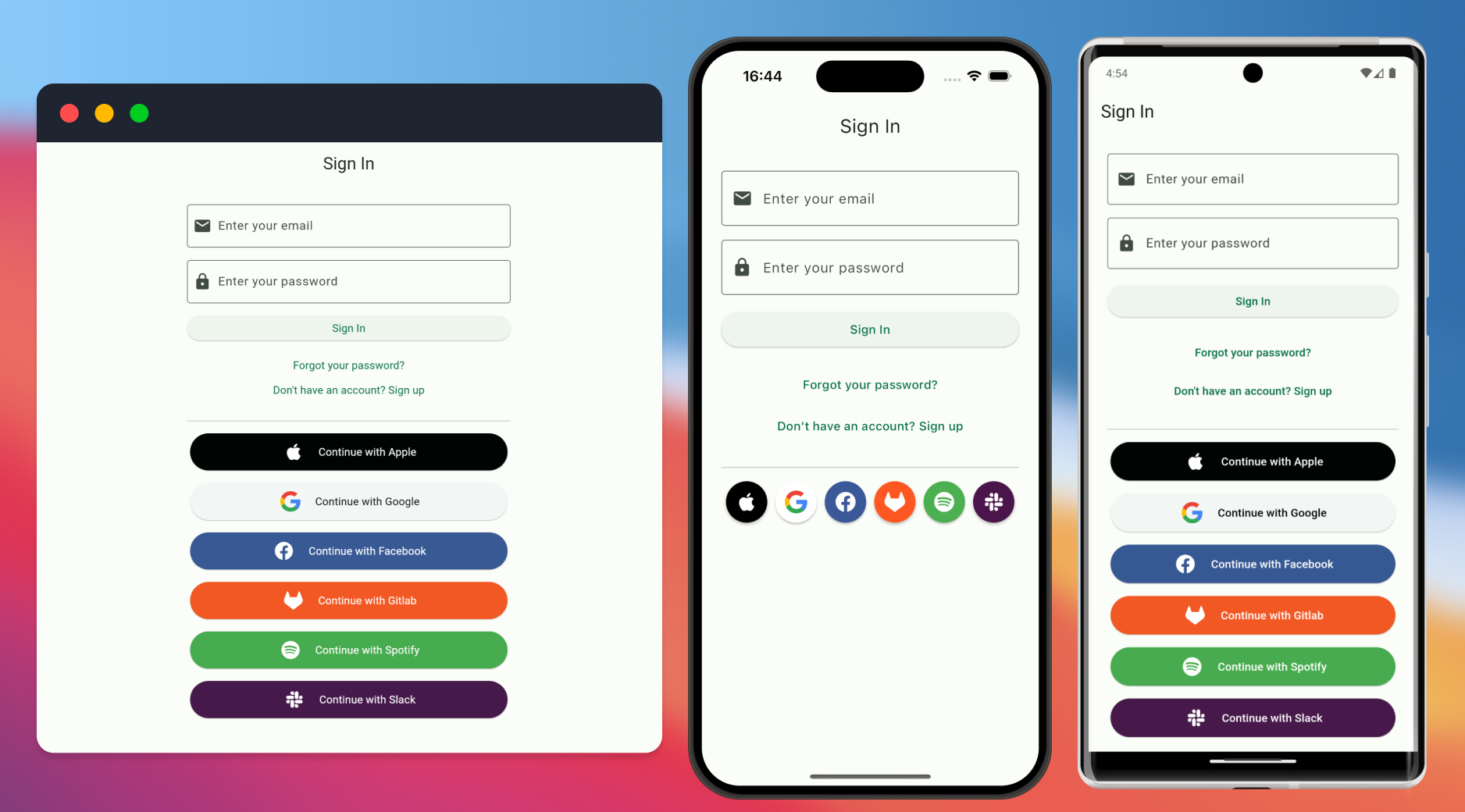
Use a SupaEmailAuth widget to create an email and password signin/ signup form.
It also contains a button to toggle to display a forgot password form.
You can pass metadataFields to add additional fields to the signup form to pass as metadata to Supabase.
You need to setup deep links in your app to if you have enabled email confirmation. Learn more about deep links on the supabase_flutter README.
// Create a Email sign-in/sign-up form
SupaEmailAuth(
  redirectTo: kIsWeb ? null : 'io.mydomain.myapp://callback',
  onSignInComplete: (response) {
    // do something, for example: navigate('home');
  },
  onSignUpComplete: (response) {
    // do something, for example: navigate("wait_for_email");
  },
  metadataFields: [
    // Creates an additional TextField for string metadata, for example:
    // {'username': 'exampleUsername'}
    MetaDataField(
      prefixIcon: const Icon(Icons.person),
      label: 'Username',
      key: 'username',
      validator: (val) {
        if (val == null || val.isEmpty) {
          return 'Please enter something';
        }
        return null;
      },
    ),

    // Creates a CheckboxListTile for boolean metadata, for example:
    // {'marketing_consent': true}
    BooleanMetaDataField(
      label: 'I wish to receive marketing emails',
      key: 'marketing_consent',
      checkboxPosition: ListTileControlAffinity.leading,
    ),
    // Supports interactive text. Fields can be marked as required, blocking form
    // submission unless the checkbox is checked.
    BooleanMetaDataField(
      key: 'terms_agreement',
      isRequired: true,
      checkboxPosition: ListTileControlAffinity.leading,
      richLabelSpans: [
        const TextSpan(
            text: 'I have read and agree to the '),
        TextSpan(
          text: 'Terms and Conditions',
          style: const TextStyle(
            color: Colors.blue,
          ),
          recognizer: TapGestureRecognizer()
            ..onTap = () {
              // do something, for example: navigate("terms_and_conditions");
            },
        ),
        // Or use some other custom widget.
        WidgetSpan()
      ],
    ),
  ]),
You can prefill the email and/or password fields by passing prefilledEmail and prefilledPassword. The corresponding fields will be initialized with these values, which the user can still edit.
SupaEmailAuth(
  prefilledEmail: 'mail@example.com',
  prefilledPassword: 'password',
  onSignInComplete: (response) {
    // do something, for example: navigate('home');
  },
  onSignUpComplete: (response) {
    // do something, for example: navigate("wait_for_email");
  },
),Use SupaMagicAuth widget to create a magic link signIn form. You need to setup deep links in your app to use magic link. Learn more about deep links on the supabase_flutter README.
SupaMagicAuth(
  redirectUrl: kIsWeb ? null : 'io.supabase.flutter://reset-callback/',
  onSuccess: (Session response) {
    // do something, for example: navigate('home');
  },
  onError: (error) {
    // do something, for example: navigate("wait_for_email");
  },
),Use SupaResetPassword to create a password reset form.
SupaResetPassword(
  accessToken: supabase.auth.currentSession?.accessToken,
  onSuccess: (UserResponse response) {
    // do something, for example: navigate('home');
  },
  onError: (error) {
    // do something, for example: navigate("wait_for_email");
  },
),Use SupaSocialsAuth to create list of social login buttons. You need to setup deep links in your app to use social auth. Learn more about deep links on the supabase_flutter README.
SupaSocialsAuth(
    socialProviders: [
        OAuthProvider.apple,
        OAuthProvider.google,
    ],
    colored: true,
    redirectUrl: kIsWeb
          ? null
          : 'io.supabase.flutter://reset-callback/',
    onSuccess: (Session response) {
        // do something, for example: navigate('home');
    },
    onError: (error) {
        // do something, for example: navigate("wait_for_email");
    },
),This library uses bare Flutter components so that you can control the appearance of the components using your own theme. See theme example in example/lib/sign_in.dart
All auth components (SupaEmailAuth, SupaPhoneAuth, SupaMagicAuth, and SupaResetPassword) support the enableAutomaticFormSubmission parameter to control whether pressing Enter/Done on the on-screen keyboard automatically submits the form.
By default, this is set to true for backward compatibility, which means pressing Enter will submit the form. If you want users to be forced to explicitly tap the submit button, set this to false:
SupaEmailAuth(
  redirectTo: kIsWeb ? null : 'io.mydomain.myapp://callback',
  enableAutomaticFormSubmission: false, // Disable auto-submit on Enter
  onSignInComplete: (response) {
    // do something, for example: navigate('home');
  },
  onSignUpComplete: (response) {
    // do something, for example: navigate("wait_for_email");
  },
),
This applies to all auth components:
// Phone Auth
SupaPhoneAuth(
  authAction: SupaAuthAction.signIn,
  enableAutomaticFormSubmission: false,
  onSuccess: (response) {
    // handle success
  },
),

// Magic Link Auth
SupaMagicAuth(
  redirectUrl: kIsWeb ? null : 'io.supabase.flutter://reset-callback/',
  enableAutomaticFormSubmission: false,
  onSuccess: (Session response) {
    // handle success
  },
),

// Reset Password
SupaResetPassword(
  accessToken: supabase.auth.currentSession?.accessToken,
  enableAutomaticFormSubmission: false,
  onSuccess: (UserResponse response) {
    // handle success
  },
),- Fork the repo on GitHub
- Clone the project to your own machine
- Commit changes to your own branch
- Push your work back up to your fork
- Submit a Pull request so that we can review your changes and merge
This repo is licensed under MIT.