feat: add device frame mockups for video export#294
feat: add device frame mockups for video export#294mvanhorn wants to merge 6 commits intosiddharthvaddem:mainfrom
Conversation


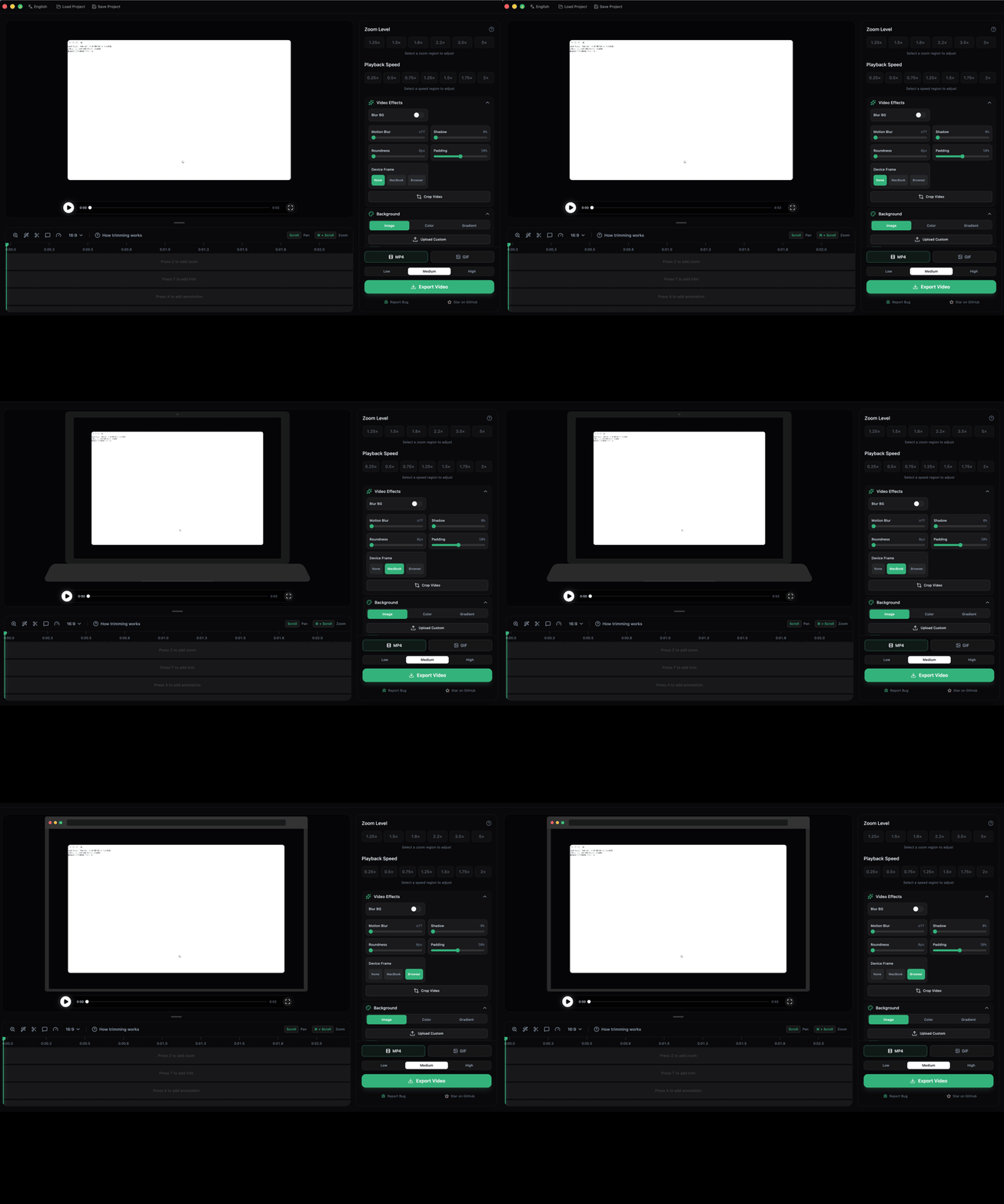
Adds MacBook and Browser window frame overlays that wrap recordings
in device mockups. Frames are SVG-based and render as the final
compositing layer in both MP4 and GIF exports.

Changes:
- New deviceFrame field in EditorState (default: "none")
- Frame definitions in src/lib/deviceFrames.ts
- SVG frame assets in public/frames/
- Frame selector UI in SettingsPanel (None/MacBook/Browser)
- Frame rendering in FrameRenderer export pipeline
- Project persistence support for device frame selection

Co-Authored-By: Claude Opus 4.6 (1M context) <noreply@anthropic.com>

|
Note Reviews pausedIt looks like this branch is under active development. To avoid overwhelming you with review comments due to an influx of new commits, CodeRabbit has automatically paused this review. You can configure this behavior by changing the Use the following commands to manage reviews:
Use the checkboxes below for quick actions:
📝 WalkthroughWalkthroughAdds a device-frame feature: new device definitions and lookup, SettingsPanel UI and editor-state plumbing, playback overlay/positioning, and exporter/frame-renderer support to composite video/webcam into device mockups for preview and export. Changes
Sequence DiagramsequenceDiagram
participant User
participant SettingsPanel
participant VideoEditor
participant EditorHistory
participant Exporter
participant FrameRenderer
User->>SettingsPanel: select device frame ("macbook")
SettingsPanel->>VideoEditor: onDeviceFrameChange("macbook")
VideoEditor->>EditorHistory: push change { deviceFrame: "macbook" }
EditorHistory-->>VideoEditor: state updated with deviceFrame
Note over VideoEditor,Exporter: Export flow
VideoEditor->>Exporter: start export (deviceFrame: "macbook")
Exporter->>FrameRenderer: initialize(config.deviceFrame)
FrameRenderer->>FrameRenderer: getDeviceFrame("macbook") -> load image
FrameRenderer->>FrameRenderer: compute screen rect & scale video/webcam into rect
FrameRenderer->>FrameRenderer: drawDeviceFrame() overlay
FrameRenderer-->>Exporter: frames rendered
Exporter-->>User: delivered export with device frame
Estimated code review effort🎯 4 (Complex) | ⏱️ ~45 minutes Possibly related PRs
Suggested reviewers
Poem
🚥 Pre-merge checks | ✅ 2 | ❌ 1❌ Failed checks (1 warning)
✅ Passed checks (2 passed)
✏️ Tip: You can configure your own custom pre-merge checks in the settings. ✨ Finishing Touches🧪 Generate unit tests (beta)
Thanks for using CodeRabbit! It's free for OSS, and your support helps us grow. If you like it, consider giving us a shout-out. Comment |
![chatgpt-codex-connector[bot]](https://avatars.githubusercontent.com/in/1144995?s=60&v=4)

There was a problem hiding this comment.
💡 Codex Review
Here are some automated review suggestions for this pull request.
Reviewed commit: 3203879e56
ℹ️ About Codex in GitHub
Codex has been enabled to automatically review pull requests in this repo. Reviews are triggered when you
- Open a pull request for review
- Mark a draft as ready
- Comment "@codex review".
If Codex has suggestions, it will comment; otherwise it will react with 👍.
When you sign up for Codex through ChatGPT, Codex can also answer questions or update the PR, like "@codex address that feedback".
| return JSON.stringify( | ||
| createProjectData(currentProjectMedia, { | ||
| wallpaper, | ||
| deviceFrame, |
There was a problem hiding this comment.

currentProjectSnapshot now serializes deviceFrame, but applyLoadedProject() never writes normalizedEditor.deviceFrame into pushState. When a user opens a project saved with a non-default frame, the editor keeps the stale in-memory frame value, so subsequent exports can use the wrong mockup and the project is immediately marked dirty because currentProjectSnapshot no longer matches lastSavedSnapshot.
Useful? React with 👍 / 👎.
| const w = this.config.width; | ||
| const h = this.config.height; | ||
|
|
||
| ctx.drawImage(this.deviceFrameImage, 0, 0, w, h); |
There was a problem hiding this comment.

drawDeviceFrame() stretches the SVG over the full export canvas and never uses the screen geometry defined in DEVICE_FRAMES, so the compositor still lays out video/webcam/annotations against the full canvas instead of the frame cutout. In practice this misaligns content for the MacBook/Browser templates (content is cropped or padded inside the transparent window), especially when padding or webcam layouts are changed.
Useful? React with 👍 / 👎.
![coderabbitai[bot]](https://avatars.githubusercontent.com/in/347564?s=60&v=4)

There was a problem hiding this comment.
Actionable comments posted: 3
Caution
Some comments are outside the diff and can’t be posted inline due to platform limitations.
⚠️ Outside diff range comments (1)
src/components/video-editor/VideoEditor.tsx (1)
185-200:⚠️ Potential issue | 🟠 MajorMissing
deviceFramewhen restoring project state.The
applyLoadedProjectfunction pushes normalized editor values to state but omitsdeviceFrame. This means when a project is loaded, the saved device frame selection is lost and defaults back to"none".🐛 Proposed fix
       pushState({
         wallpaper: normalizedEditor.wallpaper,
+        deviceFrame: normalizedEditor.deviceFrame,
         shadowIntensity: normalizedEditor.shadowIntensity,
         showBlur: normalizedEditor.showBlur,
         motionBlurAmount: normalizedEditor.motionBlurAmount,
🤖 Prompt for AI Agents
Verify each finding against the current code and only fix it if needed.

In `@src/components/video-editor/VideoEditor.tsx` around lines 185 - 200, The
applyLoadedProject routine is restoring normalizedEditor values via pushState
but omits deviceFrame, causing loaded projects to lose saved device frame
selection; update the pushState call inside applyLoadedProject (the block that
sets wallpaper, shadowIntensity, showBlur, etc.) to also include deviceFrame:
normalizedEditor.deviceFrame so the saved deviceFrame is restored when the
project is loaded.
🤖 Prompt for all review comments with AI agents
Verify each finding against the current code and only fix it if needed.

Inline comments:
In `@src/components/video-editor/SettingsPanel.tsx`:
- Around line 733-757: The "Device Frame" block in SettingsPanel.tsx currently
uses hardcoded labels; replace the static strings ("Device Frame", "None",
"MacBook", "Browser") with i18n keys (for example settings.deviceFrame,
settings.deviceFrame.none, settings.deviceFrame.macbook,
settings.deviceFrame.browser) and call the translation function t() where those
strings are used (e.g., for the header and for each frame.label in the mapping),
ensuring the component imports/uses the same t() instance as the rest of the
panel and that corresponding keys are added to the project's i18n translation
files for each supported locale; keep the onClick handler (onDeviceFrameChange)
and the deviceFrame equality checks unchanged.

In `@src/lib/exporter/frameRenderer.ts`:
- Around line 330-352: loadDeviceFrame() currently fetches the
DeviceFrameDefinition via getDeviceFrame(frameId) but only uses
frameDef.imagePath; capture and store the screen positioning data (x, y, width,
height) from the returned DeviceFrameDefinition into a new/existing property
(e.g. this.deviceFrameScreen) so downstream layout code can position video
inside the frame; specifically, after const frameDef = getDeviceFrame(frameId)
and before loading the image, assign this.deviceFrameScreen = { x: frameDef.x,
y: frameDef.y, width: frameDef.width, height: frameDef.height } (normalizing
types if needed) and keep this.deviceFrameImage assignment as-is so later video
layout computation can reference this.deviceFrameScreen.
- Around line 354-362: The device frame's screen rectangle
(DeviceFrameDefinition.screen) is computed but never applied, so drawDeviceFrame
currently paints the full frame over the canvas and hides video; fix by
converting the screen percentages to pixel coordinates using
this.config.width/height (compute screenX, screenY, screenW, screenH from
deviceFrame.screen), then ensure video rendering is constrained to that rect —
either (preferred) draw video using ctx.drawImage(source, sx, sy, sw, sh,
screenX, screenY, screenW, screenH) or apply a clipping mask (ctx.save();
ctx.beginPath(); ctx.rect(screenX, screenY, screenW, screenH); ctx.clip(); draw
video; ctx.restore()) before drawing the bezel image with
drawImage(this.deviceFrameImage, 0,0,w,h); update drawDeviceFrame and the
video-rendering location/functions to use the computed screen rect so video
appears only in the frame opening.

---

Outside diff comments:
In `@src/components/video-editor/VideoEditor.tsx`:
- Around line 185-200: The applyLoadedProject routine is restoring
normalizedEditor values via pushState but omits deviceFrame, causing loaded
projects to lose saved device frame selection; update the pushState call inside
applyLoadedProject (the block that sets wallpaper, shadowIntensity, showBlur,
etc.) to also include deviceFrame: normalizedEditor.deviceFrame so the saved
deviceFrame is restored when the project is loaded.
🪄 Autofix (Beta)
Fix all unresolved CodeRabbit comments on this PR:
- Push a commit to this branch (recommended)
- Create a new PR with the fixes
ℹ️ Review info
⚙️ Run configuration
Configuration used: defaults
Review profile: CHILL
Plan: Pro
Run ID: 662a8f2c-9658-4a93-938e-23cb1be2d6f3
⛔ Files ignored due to path filters (3)
package-lock.jsonis excluded by!**/package-lock.jsonpublic/frames/browser.svgis excluded by!**/*.svgpublic/frames/macbook.svgis excluded by!**/*.svg
📒 Files selected for processing (8)
src/components/video-editor/SettingsPanel.tsxsrc/components/video-editor/VideoEditor.tsxsrc/components/video-editor/projectPersistence.tssrc/hooks/useEditorHistory.tssrc/lib/deviceFrames.tssrc/lib/exporter/frameRenderer.tssrc/lib/exporter/gifExporter.tssrc/lib/exporter/videoExporter.ts
| <div className="p-2 rounded-lg bg-white/5 border border-white/5"> | ||
| <div className="flex items-center justify-between mb-1.5"> | ||
| <div className="text-[10px] font-medium text-slate-300">Device Frame</div> | ||
| </div> | ||
| <div className="flex gap-1.5"> | ||
| {[ | ||
| { id: "none", label: "None" }, | ||
| { id: "macbook", label: "MacBook" }, | ||
| { id: "browser", label: "Browser" }, | ||
| ].map((frame) => ( | ||
| <button | ||
| key={frame.id} | ||
| type="button" | ||
| onClick={() => onDeviceFrameChange?.(frame.id)} | ||
| className={`flex-1 text-[9px] font-medium px-2 py-1.5 rounded-md transition-all ${ | ||
| deviceFrame === frame.id | ||
| ? "bg-[#34B27B] text-white" | ||
| : "bg-white/5 text-slate-400 hover:bg-white/10 hover:text-slate-300" | ||
| }`} | ||
| > | ||
| {frame.label} | ||
| </button> | ||
| ))} | ||
| </div> | ||
| </div> |
There was a problem hiding this comment.
Hardcoded UI strings should use i18n translations.
The "Device Frame", "None", "MacBook", and "Browser" labels are hardcoded, while the rest of the settings panel consistently uses t() for translations. This creates an inconsistent experience for non-English users.
💬 Suggested fix
Add translation keys to your i18n files and replace hardcoded strings:
-<div className="text-[10px] font-medium text-slate-300">Device Frame</div>
+<div className="text-[10px] font-medium text-slate-300">{t("effects.deviceFrame")}</div>

 {[
-  { id: "none", label: "None" },
-  { id: "macbook", label: "MacBook" },
-  { id: "browser", label: "Browser" },
+  { id: "none", label: t("effects.deviceFrameNone") },
+  { id: "macbook", label: t("effects.deviceFrameMacbook") },
+  { id: "browser", label: t("effects.deviceFrameBrowser") },
 ].map((frame) => (
📝 Committable suggestion
‼️ IMPORTANT
Carefully review the code before committing. Ensure that it accurately replaces the highlighted code, contains no missing lines, and has no issues with indentation. Thoroughly test & benchmark the code to ensure it meets the requirements.
| <div className="p-2 rounded-lg bg-white/5 border border-white/5"> | |
| <div className="flex items-center justify-between mb-1.5"> | |
| <div className="text-[10px] font-medium text-slate-300">Device Frame</div> | |
| </div> | |
| <div className="flex gap-1.5"> | |
| {[ | |
| { id: "none", label: "None" }, | |
| { id: "macbook", label: "MacBook" }, | |
| { id: "browser", label: "Browser" }, | |
| ].map((frame) => ( | |
| <button | |
| key={frame.id} | |
| type="button" | |
| onClick={() => onDeviceFrameChange?.(frame.id)} | |
| className={`flex-1 text-[9px] font-medium px-2 py-1.5 rounded-md transition-all ${ | |
| deviceFrame === frame.id | |
| ? "bg-[#34B27B] text-white" | |
| : "bg-white/5 text-slate-400 hover:bg-white/10 hover:text-slate-300" | |
| }`} | |
| > | |
| {frame.label} | |
| </button> | |
| ))} | |
| </div> | |
| </div> | |
| <div className="p-2 rounded-lg bg-white/5 border border-white/5"> | |
| <div className="flex items-center justify-between mb-1.5"> | |
| <div className="text-[10px] font-medium text-slate-300">{t("effects.deviceFrame")}</div> | |
| </div> | |
| <div className="flex gap-1.5"> | |
| {[ | |
| { id: "none", label: t("effects.deviceFrameNone") }, | |
| { id: "macbook", label: t("effects.deviceFrameMacbook") }, | |
| { id: "browser", label: t("effects.deviceFrameBrowser") }, | |
| ].map((frame) => ( | |
| <button | |
| key={frame.id} | |
| type="button" | |
| onClick={() => onDeviceFrameChange?.(frame.id)} | |
| className={`flex-1 text-[9px] font-medium px-2 py-1.5 rounded-md transition-all ${ | |
| deviceFrame === frame.id | |
| ? "bg-[`#34B27B`] text-white" | |
| : "bg-white/5 text-slate-400 hover:bg-white/10 hover:text-slate-300" | |
| }`} | |
| > | |
| {frame.label} | |
| </button> | |
| ))} | |
| </div> | |
| </div> |
🤖 Prompt for AI Agents
Verify each finding against the current code and only fix it if needed.

In `@src/components/video-editor/SettingsPanel.tsx` around lines 733 - 757, The
"Device Frame" block in SettingsPanel.tsx currently uses hardcoded labels;
replace the static strings ("Device Frame", "None", "MacBook", "Browser") with
i18n keys (for example settings.deviceFrame, settings.deviceFrame.none,
settings.deviceFrame.macbook, settings.deviceFrame.browser) and call the
translation function t() where those strings are used (e.g., for the header and
for each frame.label in the mapping), ensuring the component imports/uses the
same t() instance as the rest of the panel and that corresponding keys are added
to the project's i18n translation files for each supported locale; keep the
onClick handler (onDeviceFrameChange) and the deviceFrame equality checks
unchanged.

|
Tested it out - doesn't work as expected. Ideally there should be preview rendering so the user knows how it would look. Video content is not repositioned inside the frame this is how it looks all video, you seem to be doing this on top of the video. You want to composite the video inside the frame and not on top Adding videos as proof/ demo will help a lot when reviewing |

…rlay

The video content was being composited on top of the device frame at full
canvas size instead of scaled and positioned within the frame's screen
region. This fix:

- Adds getDeviceScreenRect() to compute pixel-space screen area from the
  frame definition percentages
- When a device frame is active, clips and scales video content to fit
  inside the frame's screen area before drawing the frame overlay on top
- Adds deviceFrame prop to VideoPlayback so the preview shows the frame
  overlay with the PixiJS canvas constrained to the frame's screen region

Co-Authored-By: Claude Opus 4.6 (1M context) <noreply@anthropic.com>
There was a problem hiding this comment.
Caution
Some comments are outside the diff and can’t be posted inline due to platform limitations.
⚠️ Outside diff range comments (3)
src/components/video-editor/VideoEditor.tsx (2)
185-200:⚠️ Potential issue | 🟠 MajorProject load still drops the saved
deviceFrame.
deviceFrameis persisted in snapshots here, butapplyLoadedProject()never writesnormalizedEditor.deviceFrameback into history state. BecausepushState()is partial, loading a project can keep the previous session's frame selection and immediately mark the project dirty.🧩 Proposed fix
 			pushState({
 				wallpaper: normalizedEditor.wallpaper,
+				deviceFrame: normalizedEditor.deviceFrame ?? "none",
 				shadowIntensity: normalizedEditor.shadowIntensity,
 				showBlur: normalizedEditor.showBlur,
 				motionBlurAmount: normalizedEditor.motionBlurAmount,
Also applies to: 255-256
🤖 Prompt for AI Agents
Verify each finding against the current code and only fix it if needed.

In `@src/components/video-editor/VideoEditor.tsx` around lines 185 - 200, The
history push when applying a loaded project omits normalizedEditor.deviceFrame,
so applyLoadedProject should include deviceFrame in the object passed to
pushState (add deviceFrame: normalizedEditor.deviceFrame alongside wallpaper,
shadowIntensity, etc.); also update the other pushState call that mirrors this
block (the second occurrence that handles project load/restore) to include
deviceFrame as well so loading a project fully replaces the previous session's
frame selection and avoids marking the project dirty.
1068-1072:⚠️ Potential issue | 🟠 MajorUse the outer preview size for framed exports.
After the
VideoPlaybackchange,containerRefmeasures only the inner device-screen rect, but annotations are still authored against the full preview overlay. Passing that smaller size into both exporters changesFrameRenderer's annotation scale factor whenever a frame is enabled, so annotated exports won't match the preview.🧩 One way to fix it
-				const containerElement = playbackRef?.containerRef?.current;
-				const previewWidth = containerElement?.clientWidth || 1920;
-				const previewHeight = containerElement?.clientHeight || 1080;
+				const previewElement = playbackRef?.previewRef?.current;
+				const previewWidth = previewElement?.clientWidth || 1920;
+				const previewHeight = previewElement?.clientHeight || 1080;
That needs a separate
previewRef(or equivalentgetPreviewSize()API) exposed fromVideoPlaybackfor the outer preview wrapper, instead of reusing the now frame-localcontainerRef.Also applies to: 1074-1105, 1209-1237
🤖 Prompt for AI Agents
Verify each finding against the current code and only fix it if needed.

In `@src/components/video-editor/VideoEditor.tsx` around lines 1068 - 1072, The
current code reads the inner device-screen size from
videoPlaybackRef.current.containerRef which was changed to be frame-local,
causing exporters to scale annotations incorrectly; update VideoPlayback to
expose the outer preview dimensions (e.g., add a previewRef or getPreviewSize()
on the VideoPlayback component) and switch usages in VideoEditor (where you read
previewWidth/previewHeight) to call that new API (e.g.,
videoPlaybackRef.current.previewRef.current.clientWidth / getPreviewSize())
instead of containerRef; ensure FrameRenderer and both exporters use this outer
preview size so annotation scaling matches the preview.
src/components/video-editor/VideoPlayback.tsx (1)
205-229:⚠️ Potential issue | 🟠 Major
frameScreensplits the preview into two coordinate spaces.
layoutVideoContent()now computes geometry inside the inner screen rect, butupdateOverlayForRegion()still overwritesstageSizeReffrom the outer overlay and the webcam DOM node still renders against the outer wrapper. With a frame selected, zoom preview/drag and webcam placement drift away from the actual video, while export already offsets them into the frame. Keep those layers in the same positioned space, or apply the frame offset before using their coordinates.Also applies to: 1155-1165, 1181-1204
🤖 Prompt for AI Agents
Verify each finding against the current code and only fix it if needed.

In `@src/components/video-editor/VideoPlayback.tsx` around lines 205 - 229,
updateOverlayForRegion is still using the outer overlay's
clientWidth/clientHeight to set stageSizeRef and positioning the focus
indicator/webcam against the outer wrapper, while layoutVideoContent() now
computes geometry inside the inner "frameScreen" rect; this causes
preview/drag/webcam to drift when a frame is selected. Fix by computing and
applying the frameScreen offset/inner rect before setting stageSizeRef and
before calling updateOverlayIndicator: derive stage size and position from the
inner screen rectangle produced by layoutVideoContent (or accept and pass a
frameOffset/innerRect parameter into
updateOverlayForRegion/updateOverlayIndicator), adjust overlayEl/indicatorEl
coordinates by that offset, and ensure webcam DOM rendering uses the same inner
rect positioning instead of the outer overlay; also update the other occurrences
(the other updateOverlayForRegion usages noted) to use the same inner-rect
logic.
🤖 Prompt for all review comments with AI agents
Verify each finding against the current code and only fix it if needed.

Outside diff comments:
In `@src/components/video-editor/VideoEditor.tsx`:
- Around line 185-200: The history push when applying a loaded project omits
normalizedEditor.deviceFrame, so applyLoadedProject should include deviceFrame
in the object passed to pushState (add deviceFrame: normalizedEditor.deviceFrame
alongside wallpaper, shadowIntensity, etc.); also update the other pushState
call that mirrors this block (the second occurrence that handles project
load/restore) to include deviceFrame as well so loading a project fully replaces
the previous session's frame selection and avoids marking the project dirty.
- Around line 1068-1072: The current code reads the inner device-screen size
from videoPlaybackRef.current.containerRef which was changed to be frame-local,
causing exporters to scale annotations incorrectly; update VideoPlayback to
expose the outer preview dimensions (e.g., add a previewRef or getPreviewSize()
on the VideoPlayback component) and switch usages in VideoEditor (where you read
previewWidth/previewHeight) to call that new API (e.g.,
videoPlaybackRef.current.previewRef.current.clientWidth / getPreviewSize())
instead of containerRef; ensure FrameRenderer and both exporters use this outer
preview size so annotation scaling matches the preview.

In `@src/components/video-editor/VideoPlayback.tsx`:
- Around line 205-229: updateOverlayForRegion is still using the outer overlay's
clientWidth/clientHeight to set stageSizeRef and positioning the focus
indicator/webcam against the outer wrapper, while layoutVideoContent() now
computes geometry inside the inner "frameScreen" rect; this causes
preview/drag/webcam to drift when a frame is selected. Fix by computing and
applying the frameScreen offset/inner rect before setting stageSizeRef and
before calling updateOverlayIndicator: derive stage size and position from the
inner screen rectangle produced by layoutVideoContent (or accept and pass a
frameOffset/innerRect parameter into
updateOverlayForRegion/updateOverlayIndicator), adjust overlayEl/indicatorEl
coordinates by that offset, and ensure webcam DOM rendering uses the same inner
rect positioning instead of the outer overlay; also update the other occurrences
(the other updateOverlayForRegion usages noted) to use the same inner-rect
logic.
ℹ️ Review info
⚙️ Run configuration
Configuration used: defaults
Review profile: CHILL
Plan: Pro
Run ID: 87a6c60d-6586-400d-8cce-3e30dc577ab7
📒 Files selected for processing (3)
src/components/video-editor/VideoEditor.tsxsrc/components/video-editor/VideoPlayback.tsxsrc/lib/exporter/frameRenderer.ts
There was a problem hiding this comment.
Caution
Some comments are outside the diff and can’t be posted inline due to platform limitations.
⚠️ Outside diff range comments (1)
src/lib/exporter/frameRenderer.ts (1)
452-476:⚠️ Potential issue | 🟠 MajorAnnotations are not adjusted for device frame positioning.
When a device frame is active, the video content is scaled and offset to fit within the frame's screen rectangle (lines 707-714 compute
offsetX,offsetY,scale). However, annotations are rendered at lines 464-471 using full canvas coordinates without accounting for this transformation.This means annotations will appear at their original canvas positions rather than scaled/offset to align with the video content inside the device frame. Parts of annotations may also be rendered behind the device frame's bezel.
Consider either:
- Passing the device frame's transform (offset, scale) to
renderAnnotations()when a frame is active, or- Moving annotation rendering inside
compositeWithShadows()within the device-frame-active branch (beforectx.restore())🔧 Suggested approach (Option 2 - render annotations inside clip region)
 // Inside compositeWithShadows(), after drawing webcam in device frame mode (before ctx.restore()):
+
+      // Render annotations scaled to device frame screen
+      if (
+        this.config.annotationRegions &&
+        this.config.annotationRegions.length > 0
+      ) {
+        const previewWidth = this.config.previewWidth || 1920;
+        const previewHeight = this.config.previewHeight || 1080;
+        const baseScaleX = this.config.width / previewWidth;
+        const baseScaleY = this.config.height / previewHeight;
+        const scaleFactor = ((baseScaleX + baseScaleY) / 2) * scale;
+
+        ctx.save();
+        ctx.translate(offsetX, offsetY);
+        ctx.scale(scale, scale);
+        await renderAnnotations(
+          ctx,
+          this.config.annotationRegions,
+          w,
+          h,
+          timeMs,
+          scaleFactor / scale, // Adjust for the scale we already applied
+        );
+        ctx.restore();
+      }
+
       ctx.restore();
       return;
     }
Note: This would require passing
timeMsintocompositeWithShadows()or computing it there.🤖 Prompt for AI Agents
Verify each finding against the current code and only fix it if needed.

In `@src/lib/exporter/frameRenderer.ts` around lines 452 - 476, Annotations are
being drawn with renderAnnotations(this.compositeCtx, ...) using full-canvas
coordinates and thus ignore the device-frame transform computed when a frame is
active (offsetX, offsetY, scale inside compositeWithShadows / device-frame
branch), causing misaligned or occluded annotations; fix by applying the
device-frame transform to annotation rendering: either pass the computed
transform (offsetX, offsetY, scale) and timeMs into renderAnnotations so it can
map annotation coordinates into the framed screen rectangle, or move the
renderAnnotations call into compositeWithShadows inside the device-frame-active
branch (before the ctx.restore()) so annotations are drawn inside the
clipped/translated context; update calls and signatures accordingly
(renderAnnotations, compositeWithShadows, drawDeviceFrame, compositeCtx,
config.annotationRegions) and ensure timeMs is available where needed.
🧹 Nitpick comments (1)
src/lib/exporter/frameRenderer.ts (1)
729-742: Extract duplicated shadow rendering logic.The shadow parameter calculations (lines 729-740) are identical to lines 797-806 in the non-device-frame path. Consider extracting a helper method to reduce duplication:
♻️ Suggested refactor
private renderShadowToCanvas(sourceCanvas: HTMLCanvasElement): void {
  if (!this.shadowCanvas || !this.shadowCtx) return;

  const w = this.shadowCanvas.width;
  const h = this.shadowCanvas.height;
  const shadowCtx = this.shadowCtx;

  shadowCtx.clearRect(0, 0, w, h);
  shadowCtx.save();

  const intensity = this.config.shadowIntensity;
  const baseBlur1 = 48 * intensity;
  const baseBlur2 = 16 * intensity;
  const baseBlur3 = 8 * intensity;
  const baseAlpha1 = 0.7 * intensity;
  const baseAlpha2 = 0.5 * intensity;
  const baseAlpha3 = 0.3 * intensity;
  const baseOffset = 12 * intensity;

  shadowCtx.filter = `drop-shadow(0 ${baseOffset}px ${baseBlur1}px rgba(0,0,0,${baseAlpha1})) drop-shadow(0 ${baseOffset / 3}px ${baseBlur2}px rgba(0,0,0,${baseAlpha2})) drop-shadow(0 ${baseOffset / 6}px ${baseBlur3}px rgba(0,0,0,${baseAlpha3}))`;
  shadowCtx.drawImage(sourceCanvas, 0, 0, w, h);
  shadowCtx.restore();
}
Then call
this.renderShadowToCanvas(videoCanvas)in both paths.🤖 Prompt for AI Agents
Verify each finding against the current code and only fix it if needed.

In `@src/lib/exporter/frameRenderer.ts` around lines 729 - 742, Duplicate shadow
rendering logic should be extracted into a helper: add a private method (e.g.,
renderShadowToCanvas(sourceCanvas: HTMLCanvasElement)) that checks
this.shadowCanvas/this.shadowCtx, reads width/height, clears, saves, computes
intensity and baseBlur/baseAlpha/baseOffset from this.config.shadowIntensity,
sets shadowCtx.filter and draws the sourceCanvas, then restores; replace the
duplicated blocks in the device-frame and non-device-frame paths with a call to
this.renderShadowToCanvas(videoCanvas) (or appropriate canvas) to remove the
repeated code.
🤖 Prompt for all review comments with AI agents
Verify each finding against the current code and only fix it if needed.

Outside diff comments:
In `@src/lib/exporter/frameRenderer.ts`:
- Around line 452-476: Annotations are being drawn with
renderAnnotations(this.compositeCtx, ...) using full-canvas coordinates and thus
ignore the device-frame transform computed when a frame is active (offsetX,
offsetY, scale inside compositeWithShadows / device-frame branch), causing
misaligned or occluded annotations; fix by applying the device-frame transform
to annotation rendering: either pass the computed transform (offsetX, offsetY,
scale) and timeMs into renderAnnotations so it can map annotation coordinates
into the framed screen rectangle, or move the renderAnnotations call into
compositeWithShadows inside the device-frame-active branch (before the
ctx.restore()) so annotations are drawn inside the clipped/translated context;
update calls and signatures accordingly (renderAnnotations,
compositeWithShadows, drawDeviceFrame, compositeCtx, config.annotationRegions)
and ensure timeMs is available where needed.

---

Nitpick comments:
In `@src/lib/exporter/frameRenderer.ts`:
- Around line 729-742: Duplicate shadow rendering logic should be extracted into
a helper: add a private method (e.g., renderShadowToCanvas(sourceCanvas:
HTMLCanvasElement)) that checks this.shadowCanvas/this.shadowCtx, reads
width/height, clears, saves, computes intensity and
baseBlur/baseAlpha/baseOffset from this.config.shadowIntensity, sets
shadowCtx.filter and draws the sourceCanvas, then restores; replace the
duplicated blocks in the device-frame and non-device-frame paths with a call to
this.renderShadowToCanvas(videoCanvas) (or appropriate canvas) to remove the
repeated code.
ℹ️ Review info
⚙️ Run configuration
Configuration used: defaults
Review profile: CHILL
Plan: Pro
Run ID: 4ef2d275-b75e-422c-85aa-0b83270dbfaf
📒 Files selected for processing (3)
public/device-frame-demo.htmlsrc/lib/deviceFrames.tssrc/lib/exporter/frameRenderer.ts
✅ Files skipped from review due to trivial changes (2)
- public/device-frame-demo.html
- src/lib/deviceFrames.ts
There was a problem hiding this comment.
Actionable comments posted: 1
🤖 Prompt for all review comments with AI agents
Verify each finding against the current code and only fix it if needed.

Inline comments:
In `@src/components/video-editor/VideoPlayback.tsx`:
- Around line 1155-1164: Wrap the PIXI container (containerRef), webcam video
element (webcamVideo/webcamVideoPath) and overlay div (overlayRef) inside a
single parent div that gets the frameScreen transform (use transform and
transformOrigin "top left") so they share the same scaled/translated
coordinates; keep containerRef as the inner element for the rendered
content/shadow, render webcamVideo and overlayRef as siblings inside that
transformed parent, then render the frame image (activeFrameDef) outside that
transformed group with a higher zIndex (e.g., zIndex 40) so the frame stays on
top; if selection chrome must remain editable above the frame, move only that
chrome into a separate overlay outside the frame image rather than keeping
webcam/overlay untransformed.
🪄 Autofix (Beta)
Fix all unresolved CodeRabbit comments on this PR:
- Push a commit to this branch (recommended)
- Create a new PR with the fixes
ℹ️ Review info
⚙️ Run configuration
Configuration used: defaults
Review profile: CHILL
Plan: Pro
Run ID: 7c15b0b3-a1fd-44d3-a4dd-c11487494736
📒 Files selected for processing (1)
src/components/video-editor/VideoPlayback.tsx
| ref={containerRef} | ||
| className="absolute inset-0" | ||
| className="absolute" | ||
| style={{ | ||
| inset: 0, | ||
| ...(frameScreen | ||
| ? { | ||
| transform: `translate(${frameScreen.x}%, ${frameScreen.y}%) scale(${frameScreen.width / 100}, ${frameScreen.height / 100})`, | ||
| transformOrigin: "top left", | ||
| } | ||
| : {}), |
There was a problem hiding this comment.
Group PIXI, webcam, and overlay under the same frame transform.
This only transforms containerRef, but webcamVideo and overlayRef stay in full-canvas coordinates and still paint above the frame (zIndex 20/30 vs 15). So the editor preview can show PiP, annotations, and focus UI outside the mockup even though export composites into the device screen rect and draws the frame last.
Suggested structure
<div className="absolute inset-0" style={screenContentStyle}>
	<div ref={containerRef} className="absolute inset-0" style={{ filter: /* shadow */ }} />
	{webcamVideoPath && <video ... />}
	{pixiReady && videoReady && <div ref={overlayRef} className="absolute inset-0">...</div>}
</div>

{activeFrameDef && <img ... style={{ zIndex: 40 }} />}
If selection chrome needs to stay editable above the mockup, keep only that chrome in a separate overlay instead of the rendered content.
Also applies to: 1171-1179
🤖 Prompt for AI Agents
Verify each finding against the current code and only fix it if needed.

In `@src/components/video-editor/VideoPlayback.tsx` around lines 1155 - 1164, Wrap
the PIXI container (containerRef), webcam video element
(webcamVideo/webcamVideoPath) and overlay div (overlayRef) inside a single
parent div that gets the frameScreen transform (use transform and
transformOrigin "top left") so they share the same scaled/translated
coordinates; keep containerRef as the inner element for the rendered
content/shadow, render webcamVideo and overlayRef as siblings inside that
transformed parent, then render the frame image (activeFrameDef) outside that
transformed group with a higher zIndex (e.g., zIndex 40) so the frame stays on
top; if selection chrome must remain editable above the frame, move only that
chrome into a separate overlay outside the frame image rather than keeping
webcam/overlay untransformed.

|
Fixed the compositing. Video content now renders inside the frame instead of on top. Changes:
Demo (None / MacBook / Browser): Export path still needs verification - the frameRenderer compositing was also updated to position video inside the frame's screen coordinates. Happy to add more thorough demo videos once the preview is confirmed working on your end. |
2 participants


Summary
Adds MacBook and Browser window frame overlays that wrap recordings in device mockups. The frame renders as the final compositing layer on top of all content (video, webcam, annotations) in both MP4 and GIF exports.
Why this matters
OpenScreen positions itself as a free Screen Studio alternative. Device frame mockups are one of Screen Studio's most recognizable features. They make demos look polished without post-production.
Changes
src/lib/deviceFrames.ts(new): Frame definitions with screen area coordinates for each device typepublic/frames/macbook.svg(new): MacBook Pro frame SVGpublic/frames/browser.svg(new): Browser window frame SVGsrc/hooks/useEditorHistory.ts: AddeddeviceFrametoEditorState(default:"none")src/lib/exporter/frameRenderer.ts: Loads device frame image during init, draws it as the topmost compositing layer inrenderFrame()src/lib/exporter/videoExporter.ts: PassesdeviceFrameconfig to FrameRenderersrc/lib/exporter/gifExporter.ts: Same for GIF export pathsrc/components/video-editor/SettingsPanel.tsx: Frame selector UI (None/MacBook/Browser buttons)src/components/video-editor/VideoEditor.tsx: WiresdeviceFramestate through save/export pathssrc/components/video-editor/projectPersistence.ts: Persists frame selection in project filesHow it works
FrameRenderer.loadDeviceFrame()loads the SVG as an HTMLImageElementdrawDeviceFrame()draws the frame overlay on topThe frame overlay approach is intentionally simple: the SVG image is drawn on top of the composite canvas at full size. The video content underneath already fills the frame's screen area because the frame SVGs have transparent screen regions.
Testing
npx tsc --noEmit)This contribution was developed with AI assistance (Claude Code).
Summary by CodeRabbit