
Adds images and videos to the Android Gallery and iOS Photos
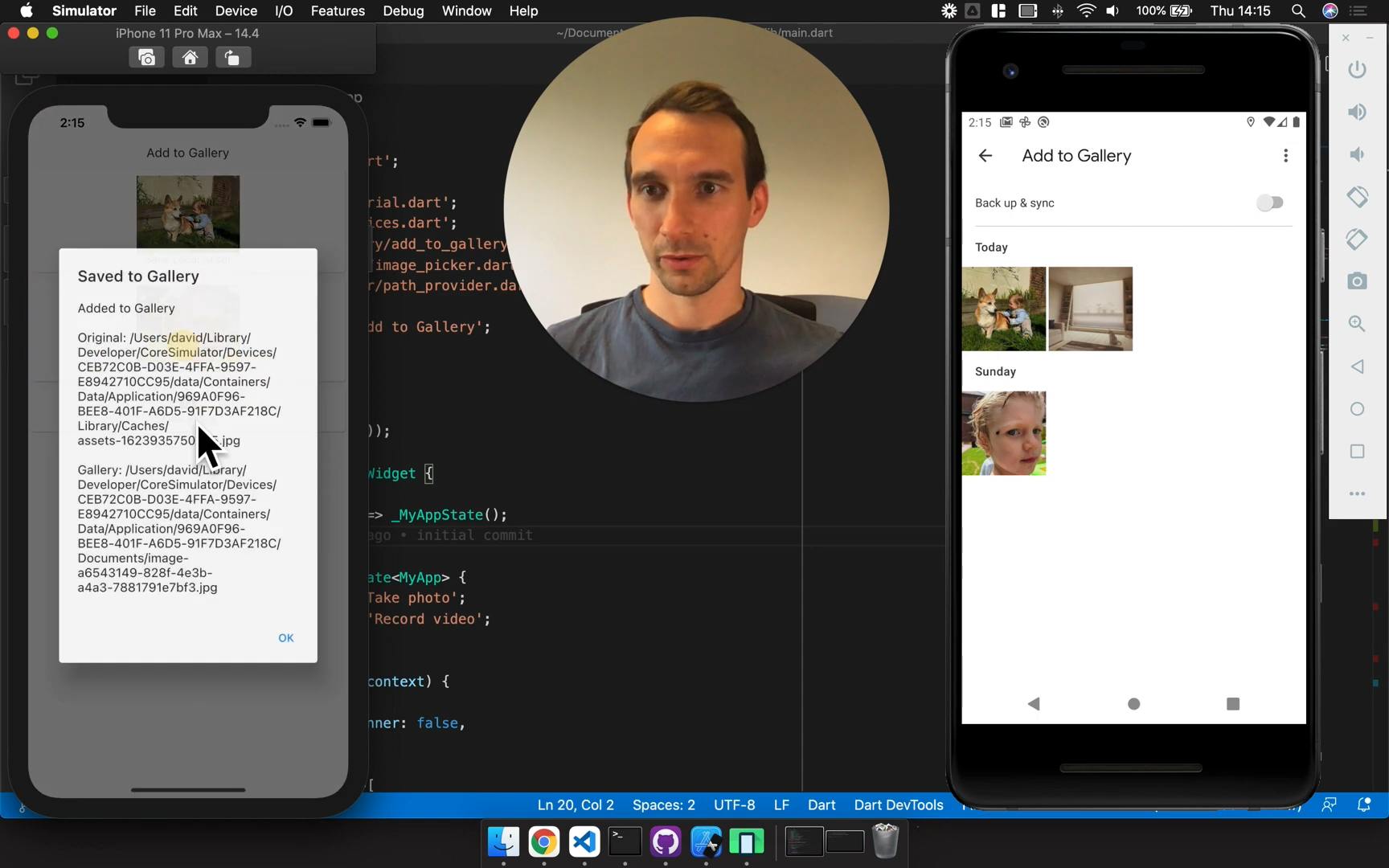
View example app
💡 There are a few important notes about Google photos, iOS filepaths and checking for duplicates. Jump to the end of this page for info!
Add add_to_gallery as a dependency in your pubspec.yaml file.
- Flutter 3.44 or later (Dart 3.12)
- iOS 13 or later, with Swift Package Manager or CocoaPods
- Android 7.0 (API 24) or later
Using an older version of Flutter? Stay on add_to_gallery: ^0.5.0.
You need the following permissions in your app:
- iOS
NSPhotoLibraryUsageDescription- This allows the plugin to use the PHPhotoLibrary APIs to add assets to the user's photo library.
- Limited access works too: the plugin can still create the album and add new photos and videos. iOS may show its own limited-access prompt; add
PHPhotoLibraryPreventAutomaticLimitedAccessAlertto yourInfo.plistto stop it.
- Android
- Android 9 and below need
WRITE_EXTERNAL_STORAGE, requested at runtime, to save to the gallery - Android 10 and above don't need a permission to save to the gallery
- Android 10 doesn't allow reading shared storage by file path. To read the returned
File(for example withImage.file), you also needREAD_EXTERNAL_STORAGEand requestLegacyExternalStorage="true" - Android 11 and above can read the files your app saved without a permission
- ^ the example app shows how to request these permissions:
- Android 9 and below need
<uses-permission android:name="android.permission.READ_EXTERNAL_STORAGE" android:maxSdkVersion="29" />
<uses-permission android:name="android.permission.WRITE_EXTERNAL_STORAGE" android:maxSdkVersion="28" />

<application android:requestLegacyExternalStorage="true" ...>
This plugin does not manage permissions for you. By excluding permissions from our plugin we have created a simple, reliable plugin.
We recommend using permission_handler to handle permissions.
There's only one method. It copies the source file to the gallery and returns the new file.
It recognises images (.jpg, .jpeg, .png, .gif, .webp, .tif, .heic) and videos (.mp4, .mov, .avi, .wmv, .3gp, .mkv, .flv) by their extension, and throws an ArgumentError for other files. The gallery must also support the file's format: for example, iOS Photos doesn't import .wmv, .mkv or .flv videos, so saving them fails. On Android, images are saved to Pictures/<albumName> and videos to Movies/<albumName>.
File file = await AddToGallery.addToGallery(
  originalFile: File('/Some/Media/Path.jpg'),
  albumName: 'My Awesome App',
  deleteOriginalFile: false,
  keepFilename: true,
);
print("Saved to gallery with Path: ${file.path}");
Using permission_handler, this may look like:
Future<void> _addToGalleryExample() async {
  try {
    await _grantPermissions();
    File file = await AddToGallery.addToGallery(
      originalFile: File('/Some/Media/Path.jpg'),
      albumName: 'My Awesome App',
      deleteOriginalFile: true,
      keepFilename: true,
    );
    print("Saved to gallery with Path: ${file.path}");
  } catch(e) {
    print("Error: $e");
  }
}

Future<void> _grantPermissions() async {
  final int? androidVersion = Platform.isAndroid
      ? (await DeviceInfoPlugin().androidInfo).version.sdkInt
      : null;
  // We need storage on:
  // - iOS to pick files from other apps
  // - Android 9 and below to write to the gallery
  // - Android 10 to read the saved file (with requestLegacyExternalStorage)
  if (Platform.isIOS || (androidVersion != null && androidVersion <= 29)) {
    if (!await Permission.storage.request().isGranted) {
      throw ('Storage Permission Required');
    }
  }
  // We need photos on iOS to add to the photo library
  // Android 10 and above can add to the gallery without a permission
  if (Platform.isIOS) {
    PermissionStatus status = await Permission.photos.request();
    if (!status.isGranted && !status.isLimited) {
      throw ('Photos Permission Required');
    }
  }
}The example app shows a few more edge-cases in action.
- Uses permission_handler to request permissions
- Uses image_picker to take photos and record videos with the camera
- Copies image and video assets to the gallery
- Uses shared_preferences to save and read the file path locally
- This shows that the assets are still accessible between reboots
- On iOS it rebuilds the path from the documents directory, see the note about iOS Filepaths below
Add to Gallery is based on gallery_saver with some notable differences. Enough to warrant a new package rather than a pull-request. Generally speaking, I've simplified the API and unified the behaviour on iOS and Android. It also supports scoped storage on Android (which will be enforced with Android 11)
Big thanks to the Tecocraft LTD team for Android functionality on Android 10 and 11.
| Feature |
gallery_saver
original package |
add_to_gallery
this package |
|---|---|---|
| General Behaviour |
Android
|
Android and iOS
|
| Return Value | Returns bool for the success of the operation
|
Returns a File pointing to the new file in the gallery |
| Remote Files | Automatically downloads files that start with http | Does not download files that start with http |
| Album Name | Optional with default values | Is required |
| Image Manipulation |
Android
|
Does not manipulate images |
| Permissions | Handled within the plugin. The first-call fails silently due to permissions race-condition | Not handled within the plugin |
Google Photos has a built-in feature to remove exact duplicates. It can be confusing to see your media disappearing like this. I considered addressing this behaviour in the plugin, but decided against it. I expect plugin users to be creating unique images with the camera or other methods.
Simply, it will change when new versions of your app are released. For example:
- The user installs
1.0.0of your app, the path is:.../<A-UNIQUE-DIRECTORY>/Documents/your-file.jpg - The user upgrades to
2.0.0, the path is now:.../<A-DIFFERENT-UNIQUE-DIRECTORY>/Documents/your-file.jpg
This becomes an issue when you try to access the file later, as the path has changed.
To handle this, you can use the path_provider package to build the path dynamically. Here's an example:
// 1. We used `add_to_gallery` to save a file, and stored the `file.path` locally (in a db, shared preferences etc.)
// 2. The user then updated their app
// 3. They re-opened the app, and we want to access the file again:
import 'package:path_provider/path_provider.dart';
final fileName = basename(filePath);
storageDirectory = await getApplicationDocumentsDirectory();
final sourcePath = '${storageDirectory.path}/$fileName'; // This is the new pathThis plugin only adds files to the gallery, it doesn't search it. To avoid saving duplicates, store the path that addToGallery returns (as the example app does) and check it before saving again:
- On Android, the path points at the file in the gallery
- On iOS, Photos doesn't expose file paths, so the path points at your app's copy in the documents directory (see the note above)
To search the photo library itself, use a package such as photo_manager.