








Compilot CLI is a tool designed to automate the creation of React components, pages, hooks, and services based on predefined templates. It streamlines the development process by generating boilerplate code, allowing developers to focus on building features rather than setting up file structures.
• 🧩 Component Generation: Quickly create React components with TypeScript support, including stories for Storybook.
• 📄 Page Creation: Generate pages with logic, view, and routing setup.
• 🔁 Custom Hooks: Easily create reusable hooks with Zustand, React context-api or local state.
• 🔌 Service Setup: Generate services with TypeScript types, mock data, and handlers for API calls.
• 💬 Prompt-Based Interface: User-friendly prompts guide you through the creation process.
• ⚙️ Customizable Configuration: Default paths, language, files activation or naming customization can be overridden with a user-defined configuration file.
|
|
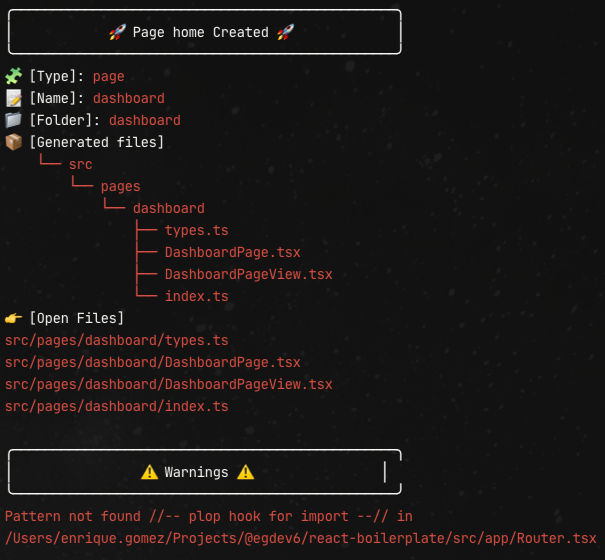 |
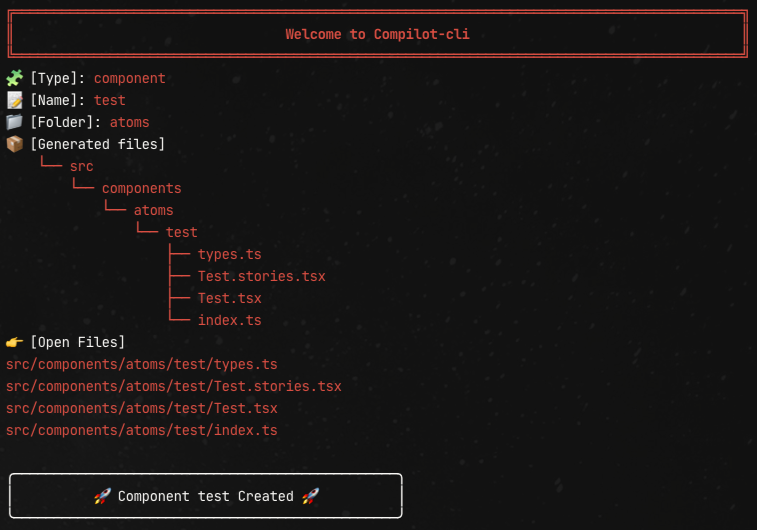
npm i -D @egdev6/compilot-clinpx compilot-cliFollow the prompts to select the type of component you want to create (component, page, hook, or service) and provide the necessary details.
The package includes a default configuration file that defines the base paths and file extensions for the generated files. The default configuration looks like this:
{
	"config": {
		"language": "typescript", // ["typescript", "javascript"]
		"generatedFiles": true, // [true, false]
		"openFiles": true // [true, false]
	},
	"components": {
		"base": "src/components",
		"atomic": true, // [true, false]
		"naming": {
			"folder": "kebabCase" // ["kebabCase", "pascalCase", "camelCase"]
		},
		"files": {
			"types": "file", // ["file", "inline"]
			"stories": true, // [true, false]
			"test": true // [true, false]
		}
	},
	"pages": {
		"base": "src/pages",
		"routes": "src/app/Router.tsx",
		"files": {
			"types": "file", // ["file", "inline"]
			"lazy": true // [true, false]
		}
	},
	"hooks": {
		"base": "src/hooks",
		"context": {
			"file": "src/app/main.tsx",
			"mode": "tree" // ["tree", "array"]
		}
	},
	"services": {
		"base": "src/services",
		"axios": "src/config/axios",
		"types": "src/models/api",
		"mocks": {
			"enabled": true, // [true, false]
			"data": "src/mocks/data",
			"server": "src/mocks/server.ts"
		}
	}
}
If you want to customize the paths or file extensions, you can create a compilot.config.json file in the root of your project. This file will override the default configuration.
{
	"config": {
		"language": "javascript",
		"generatedFiles": false,
	},
  	"components": {
		"base": "src/components",
		"atomic": false,
		"naming": {
			"folder": "pascalCase"
		},
		"files": {
			"types": "inline",
			"stories": false,
			"test": false
		}
	},
}
In this example:
- Files will be generated with the
.jsextension. - Disable output for generated files.
- Components will be created in the
custom/componentsfolder. - The "atomic" methodology is disabled
- The component folder in pascalCase
- Disable .stories and .test generated files
- Nested Folder Structure: Use folder paths like
src/pages/home/userto create nested routes.- Command:
npx compilot-cli - Type:
page - Name:
user - Folder:
src/pages/home/user - Result: Generates
src/pages/home/user/UserPage.jsxwith route added tosrc/app/Router.tsx.
- Command:
- Multiple Nested Levels: For
src/pages/admin/dashboard/settings, repeat the process.- Name:
settings - Folder:
src/pages/admin/dashboard/settings
- Name:
- Custom Route Example: Add a comment in
Router.tsxlike://-- plop hook for import --// {/*-- plop hook for route --*/} <Route path="/admin/*" element={<AdminLayout />}> {/*-- plop hook for nested route --*/} </Route>
#### 🧪 How the “Atomic” Methodology Works

When the "atomic" methodology is enabled, the generated files will be organized into folders based on their atomic design category (e.g., `atoms`, `molecules`, `organisms`). For example:
src/components ├── atoms │ └── button │ ├── Button.tsx │ ├── Button.stories.tsx │ └── index.ts ├── molecules │ └── form │ ├── Form.tsx │ ├── Form.stories.tsx │ └── index.ts └── organisms └── header ├── Header.tsx ├── Header.stories.tsx └── index.ts
If the "atomic" methodology is disabled, all components will be generated in a flat structure under the config `components` folder:
src/components ├── button │ ├── Button.tsx │ ├── Button.stories.tsx │ └── index.ts ├── form │ ├── Form.tsx │ ├── Form.stories.tsx │ └── index.ts └── header ├── Header.tsx ├── Header.stories.tsx └── index.ts
#### 🧪 Adding Providers to your project with hook context type

If you choose context when create a hook because you're using React api-context, you can add a comment in your provider file to auto generate tree Providers nesting.
Ensure than file path is correctly configured:

```json
	"hooks": {
		"context": {
			"file": "src/app/main.tsx",
			"mode": "tree"
		}
	},
If you want the page type to automatically insert a lazy/regular import and the route into your routes file, you need to add specific comments to the file configured in config.pages.routes. These comments act as placeholders where the tool will append the necessary code.
Ensure than file path is correctly configured:
	"pages": {
		"routes": "src/app/Router.tsx",
		"files": {
			"types": "file",
			"lazy": true
		}
},If you want the service type to automatically insert a mock into your server file, you need to add specific comments to the file configured in config.services.mocks.server and turn on config.services.mocks.enabled. These comments act as placeholders where the tool will append the necessary code.
	"services": {
		"mocks": {
			"enabled": true,
			"data": "src/mocks/data",
			"server": "src/mocks/server.ts"
		}
	}
I recommend configure this package in your project: https://github.com/reinerBa/vite-plugin-mock-simple
Move all the calls in mockSimple([]) to a folder and export it for vite.
import mockSimple from 'vite-plugin-mock-simple'
import { mockServer } from 'src/mocks/mockServer.ts'

export default defineConfig({
  plugins: [
    mockSimple(mockServer)
  ]
})
Add this variable to your .env.development
VITE_ENVIROPMENT='DEV'
Add the following comments to your routes file (e.g., src/app/Router.tsx):
//-- plop hook for import --//
{/*-- plop hook for route --*/}
Add the following comments to your app providers file (e.g., src/app/main.tsx):
{/*-- plop hook for providers --*/}<App/>Add the following comments to your mock file (e.g., src/mocks/server.tsx):
//-- plop hook for mocks -- //Contributions are welcome! Please open an issue or submit a pull request for any enhancements or bug fixes. If you like the tool... 🌟 always help!!!
This project is licensed under the MIT License. See the LICENSE file for more details.