




Live page · All agent starters · Hosted Hermes agents · AI App Builder · On CompanyFabric · Get a model key
Coming soon. Live scheduling goes through Creative Tim Social Studio, which opens once its channel connectors are approved. Until then, run the labelled DEMO: it needs no keys and shows the whole flow on a sample studio.
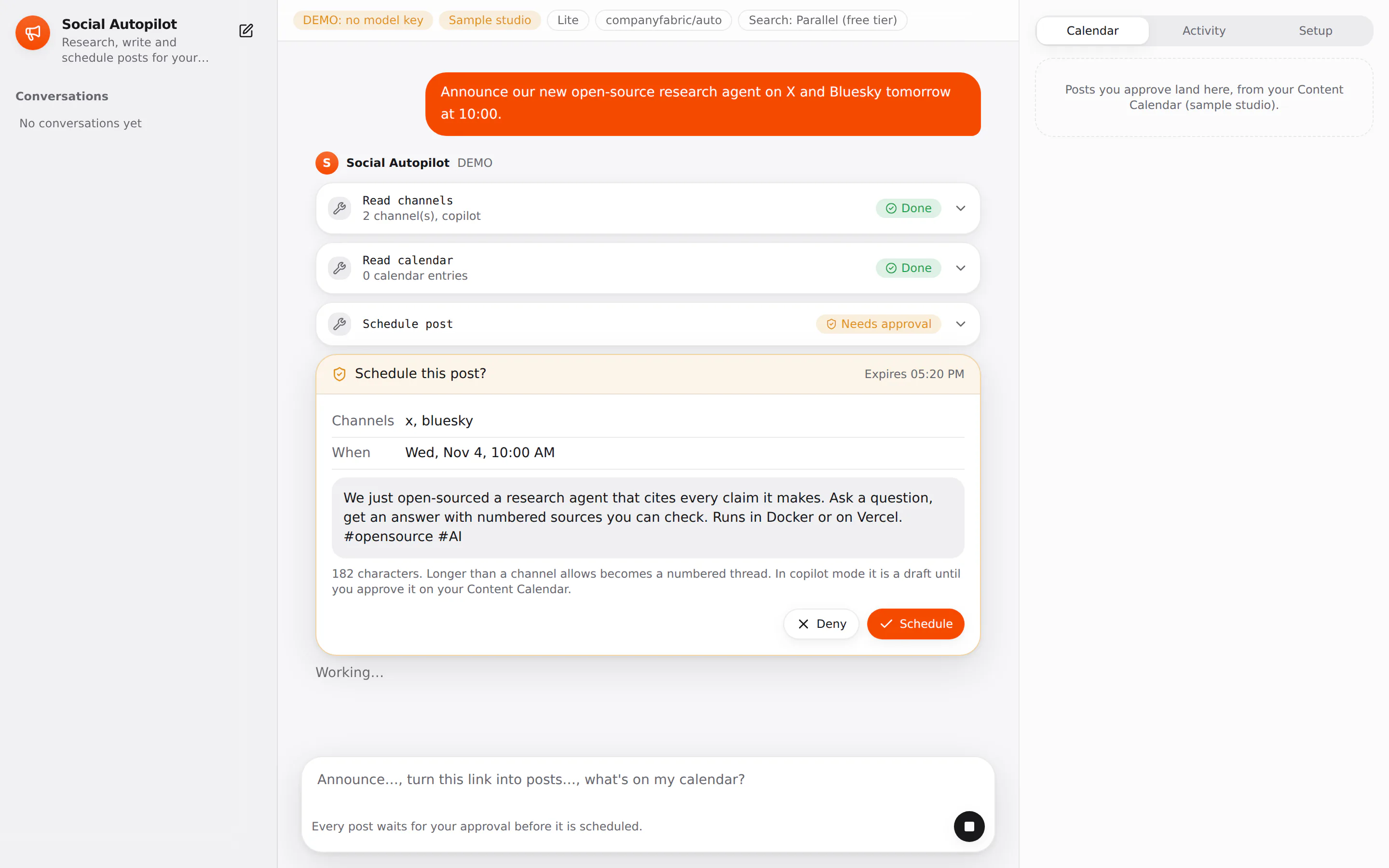
An open-source social media agent. Give it a topic, a link or an announcement: it researches when facts are needed, writes a post that fits each of your channels, checks your calendar, and schedules it through Creative Tim Social Studio. Nothing is scheduled until you approve it in this app.
Two gates stand before anything goes out:
- This app: every schedule and cancel is an approval card showing the exact text, channels and time. The tool layer enforces it on the server, and there is no publish-now tool.
- Social Studio: your account's autonomy setting. In copilot mode (the default) a scheduled post is a draft you approve on your Content Calendar; in autopilot it is armed. Social Studio also applies each channel's rules and your key's scopes.
| Lite | Hermes | |
|---|---|---|
| Start | pnpm dev |
docker compose up |
| Research, write per channel, schedule after approval, audit | yes | yes |
| Memory of your brand voice across conversations | no | yes |
| A recurring content plan | no | Hermes cron works; this UI does not manage schedules yet |
| Serverless hosting (Vercel) | yes | no |
Status: early. Verified in CI: install, typecheck, unit and contract tests (approval before scheduling, sample studio, the Social Studio client and its error handling), production build, and Hermes starting with the agent's tools loaded. Scheduling against live Social Studio is
implemented-untesteduntil it runs with a real key.
Needs Node.js 22.13+ and pnpm. From the repository root:
pnpm install
cp .env.example .env
pnpm dev
With no model key it runs a DEMO on a sample studio (two fictional channels, in memory): it reads the channels and the calendar, writes an announcement, and asks you to approve scheduling it. Nothing is posted anywhere. Add a model key (same options as Open Research) and DEMO_DATA=true to try a live model on the sample studio.
- On creative-tim.com, connect your channels on the Content Calendar and choose copilot or autopilot.
- Create a key with the
social:draftscope at creative-tim.com/dashboard/api-keys. Addsocial:publishonly if your account runs in autopilot: in autopilot a schedule arms a post, which needs it. A CompanyFabric key (sk-cf-…) works too once your accounts are linked and the key holds those scopes. - Put it in
.envasSOCIAL_API_KEYand restart.
Agents can schedule text to X and Bluesky today. Other channels show in the channel list with how to post to them.
cp .env.example .env    # model key, SOCIAL_API_KEY, HERMES_API_KEY and TOOL_TOKEN (openssl rand -hex 32)
docker compose up --build
Hermes runs each turn and calls the agent's tools back over MCP (/api/mcp, bearer TOOL_TOKEN), so approvals and the audit log are the same as in lite mode, and the Social Studio key never reaches the Hermes container.
- No login by default. With a key set, whoever can open the app can approve posts to your channels. The compose file binds it to
127.0.0.1; setAPP_PASSWORDwhenever it is reachable from anywhere else. - Web pages and search results are data for the model, never instructions.
- Give the key the narrowest scope that works:
social:draftin copilot mode.
social.config.ts holds the instructions, a policy per tool (allow, approve, or deny by leaving it out) and limits.
| Tool id | What it does |
|---|---|
social.channels |
connected channels, each one's rules, and the autonomy mode |
social.queue |
the Content Calendar: drafts, scheduled, published, failed |
social.schedule |
schedule one post to one or more channels at a time |
social.cancel |
cancel a draft or scheduled entry |
search.web, page.read |
research, as in Open Research |
social.config.ts           identity, instructions, tool policies, limits
src/lib/studio.ts          Social Studio's REST tool door, and the sample studio
src/lib/tools.ts           the social tools
src/lib/demo.ts            the scripted DEMO turn
src/components/social-app.tsx   the app, on the shared UI (packages/ui)
packages/kit/                    shared with every starter: tool broker, runtimes, MCP server, search, SQLite
MIT. See LICENSE and NOTICE.
Not affiliated with X, Bluesky or any other social network.
Free and MIT, from the same kit: one tool layer, approvals, an audit log, and a labelled demo with no keys. See them all on the agent starters page.
| Open Research | Research with numbered citations you can check |
| Open Coworkers | Specialist AI coworkers with their own permissions and hand-offs |
| Open Exec | An executive assistant for Gmail and Google Calendar |
Want it without running anything yourself? These are live on creative-tim.com.
Build with AI
| AI App Builder | Websites, dashboards, slide decks and ads from one prompt. Edit right on the page, deploy in one click. |
| App examples | Finished apps to remix as your starting point |
| Discover | Apps other people built, ready to remix |
| AI Video Studio | One product photo in; product images and a short video out |
Hosted agents
| Hermes Agent hosting | A Hermes agent with memory and web tools, running in the cloud |
| Spawn an AI agent | Any role you need, in a minute |
| Hire an AI employee | Ready-made roles that are always on |
For developers
| Skills.md & Stacks | Skills for Claude Code, Cursor and Codex |
| Creative Tim UI | shadcn/ui blocks for your app, v0 and Lovable |
| Registry and MCP | Install the blocks from coding agents over MCP |
| Claude Code guide | From your first prompt to agents that ship |
| AI tool comparisons and cheatsheets | Pick the right tool, and its shortcuts on one page |
| CompanyFabric | One key for every major model, the default model route for this starter: get a key, models and pricing |
| CompanyFabric templates | This starter and the others, ready to run with your CompanyFabric key |
| Premium templates | React, Next.js, Vue and HTML templates and dashboards |
Contributing: see CONTRIBUTING.md. Security: see SECURITY.md.