It's a small service to process emails coming from all kinds of clients using Microsoft Storage Queue and Azure functions.
It uses Durable Entities to hold the small state shared between the running functions.
The combination between Queue and Function will allow the service to scale up and down smoothly and fast, the integration contains a retry mechanism and can handle the fault.
The service implements 4 kinds of Email Providers:
- SendGrid
- AWS SES
- MailGun
- Fake Service, which is a fake implementation of the service for testing.
The service is integrated with Sentry for Error Capturing. Connected with Humio for logging in addition to Azure App Insights support for metrics and logging too.
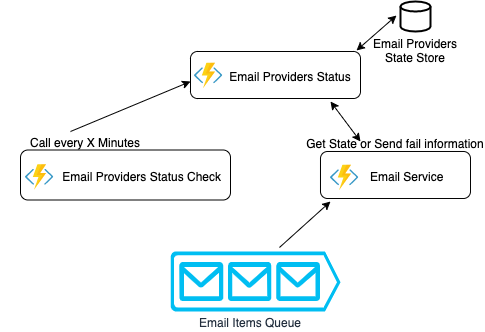 The service consists of 3 supporting functions
A Durable Entity, a function that provides a state for the running functions, it contains the calculation needed to enable and disable email providers depending on their failure rate. The functionality of this small function/service will be called or signaled from the other two functions.
If a specific provider reached the failure threshold in a specific time period it will be disabled for X period of time (can be configured by using the key disableperiod), and after the period pass it will come back to be used again.
The main and the responsible of sending provided emails through the queue. It will try first to get the current email providers tate from Email Providers Status Function, if it wasn't created by the call time, it will take the first one from the config file. If it's able to acquire the state then it will use it.
If the run failed it will send a signal (one-way call) to the Email Providers Status that the Email provider X failed and Email Providers Status should do the math.
If it failed to run the function it will retry 5 times then queue it in the poisoned items queue, the time between each retry is 30 seconds and can be configured from the settings.
A small time trigger function that will run every x minutes in my case 3 minutes. It will send a signal to the email provider status function to check the disabled providers and if the disable time of any of them has passed to return it to the providers.
You need to set these environment variables
{
    "AzureWebJobsStorage": "UseDevelopmentStorage=true",
    "EmailServiceStorageCS": "UseDevelopmentStorage=true",
    "FUNCTIONS_WORKER_RUNTIME": "dotnet",
    "humio__token": "YOUR_TOKEN",
    "humio__ingesturl": "https://cloud.humio.com/api/v1/ingest/elastic-bulk",
    "sentry__dsn": "DSN",
    "emailproviders__sendgrid__apikey": "APIKEY",
    "emailproviders__mailgun__apikey": "APIKEY",
    "emailproviders__mailgun__domain": "APIKEY",
    "emailproviders__mailgun__baseurl": "https://api.mailgun.net",
    "emailproviders__amazonses__keyid": "APIKEY",
    "emailproviders__amazonses__keysecret": "APIKEY",
    "emailproviderssettings__supportedproviders__0": "Fake",
    "emailproviderssettings__supportedproviders__1": "Fake2",
    "emailproviderssettings__threshold": 1,
    "emailproviderssettings__timewindowinseconds": 5,
    "emailproviderssettings__disableperiod": 30
  }
Or if you will run it locally you can set it in the file local.settings.json.
You can get it from here https://github.com/Azure/azure-functions-core-tools. I used the runtime v2 which is the latest stable version. V3 still in preview and there is no guarantee that it will give the same behavior.
You need to have a storage account to hold the function information and the context state. You can get an emulator from here. The emulator for windows can run Blob, Table and Queue.
The emulator for MacOs can only run Blob and Queue, and there is no other replacement to use the Table. I would suggest to create a storage account for test purpose on Azure and add the connection string to your config file so you can use it instead of the emulator.
You can use the emulator if you want to run the queue of the email service EmailServiceStorageCS.
MacOs You can create a storage account in Azure and set the connection string as an environment variable or you can run a storage emulator. I recommend using Azurite Emulator, you need to have docker. Use this command to run the storage with Blob and Queue
docker run --rm -it -p 10000:10000 -p 10001:10001 mcr.microsoft.com/azure-storage/azurite azurite --blobPort 10000 --blobHost 0.0.0.0 --queuePort 10001 --queueHost 0.0.0.0 --looseWhen deploying The function in azure and connecting it with Azure Monitor(App Insights), you get a lot of metrics and stats out of the box, because there is a deeper connection between the function runtime, azure storage, and the function.
Examples


Note The metrics data can be viewed in Grafana with Azure Monitor plugin.