



This project sets up a local Kubernetes cluster using Vagrant and VirtualBox. It creates two Ubuntu 24.04 virtual machines: one control plane node and one worker node with automatic installation of Docker, Kubernetes components, and necessary configurations.
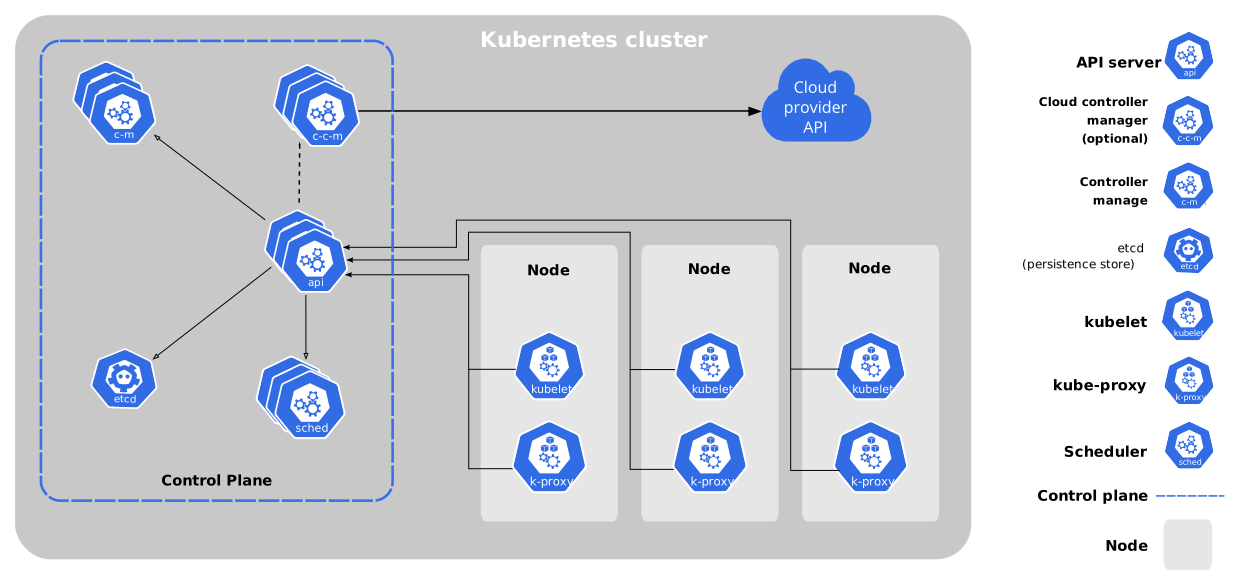
graph TB
    subgraph Vagrant-Managed Environment
        subgraph Control Plane Node
            A[Control Plane] --> B[API Server]
            B --> C[etcd]
            B --> D[Controller Manager]
            B --> E[Scheduler]
        end
        subgraph Worker Node
            F[kubelet] --> G[Container Runtime]
            H[kube-proxy] --> G
        end
        B <-.-> F
        B <-.-> H
    end
    style Control Plane Node fill:#f9f,stroke:#333,stroke-width:2px
    style Worker Node fill:#bbf,stroke:#333,stroke-width:2px
- VirtualBox
- Vagrant
- At least 4GB of RAM available
- At least 20GB of free disk space
| 🔄 | Automated VM provisioning with Ubuntu 24.04 |
| 🌐 | Pre-configured network settings |
| 🐳 | Automatic installation of Docker and Kubernetes components |
| 🚀 | Ready-to-use Kubernetes cluster setup |
| 📜 | Easy-to-use Bash Scripts for Kubernetes cluster setup - reduce typing errors |
| 🔒 | Secure communication between nodes |
| 🔍 | Easy monitoring and management |
Note about IP Addressing: This configuration uses
192.168.63.11and192.168.63.12for the control plane and worker nodes respectively. You can modify these IPs in theVagrantfileto use any IP addresses from your router's IP range that are outside the DHCP scope. Make sure to choose IPs that won't conflict with other devices on your network.
| Control Plane Node | Worker Node |
|---|---|
IP: 192.168.63.11
Hostname: cplane
Memory: 2048MB
CPUs: 2
Role: Control Plane |
IP: 192.168.63.12
Hostname: worker
Memory: 2048MB
CPUs: 2
Role: Worker |
💡 Tip: Before starting, you may want to adjust the IP addresses in the
Vagrantfileif the default IPs (192.168.63.11, 192.168.63.12) conflict with your network setup. Edit theprivate_networkIP settings in the Vagrantfile to match your network requirements.
- Clone this repository:
git clone <repository-url>
cd vagrant- Start the cluster:
vagrant up- SSH into the control plane node:
vagrant ssh cplane- SSH into the worker node:
vagrant ssh worker- Stop the cluster:
vagrant halt- Destroy the cluster:
vagrant destroyClick to expand installed components
| Component | Version | Description |
|---|---|---|
| Docker CE | Latest | Container runtime engine |
| kubelet | Latest | Node agent |
| kubeadm | Latest | Cluster bootstrapping tool |
| kubectl | Latest | Command-line interface |
| containerd | Latest | Container runtime |
| Weave CNI | v2.8.1 | Container Network Interface |
After the VMs are up and running, follow these steps to initialize your Kubernetes cluster:
First, log into the control plane node:
vagrant ssh cplanePull required Kubernetes images:
sudo kubeadm config images pullInitialize the cluster:
sudo kubeadm init --pod-network-cidr=10.244.0.0/16 --apiserver-advertise-address=192.168.63.11After the cluster initialization, install Weave CNI:
kubectl apply -f https://github.com/weaveworks/weave/releases/download/v2.8.1/weave-daemonset-k8s.yamlWith the shutdown of Weaveworks, Weave CNI has been effectively discontinued, the GitHub repo archived in June 2024. So a new CNI should be considered, and the first suggestion is Flannel
First, install Flannel CNI:
kubectl apply -f https://raw.githubusercontent.com/flannel-io/flannel/master/Documentation/kube-flannel.yml Then, restart the Kublet service:
sudo service kubelet restartFor ease of use, a single script cluster_init.sh was created as a function of the "vagrant up" command for the control plane(s) that performs all of the above steps:
- k8s image pull
- kubeadm init
- local copy of "kube config"
- Weave CNI install
and can be run with the vagrant command:
vagrant ssh cplane -c "./cluster_init.sh"Copy the kubeadm join command from the control plane node's initialization output and run it on the worker node with sudo privileges.
For ease of use, script join_cmd.sh was created to display the join command for use on worker nodes with this vagrant command:
vagrant ssh cplane -c "./join_cmd.sh"After joining the worker node, verify the cluster status from the control plane node:
# Check node status
kubectl get nodes
Expected output (it may take a few minutes for the nodes to be ready):
NAME     STATUS   ROLES           AGE     VERSION
cplane   Ready    control-plane   5m32s   v1.30.x
worker   Ready    <none>          2m14s   v1.30.x
Note: The nodes may show
NotReadystatus initially as the CNI (Container Network Interface) is being configured. Please wait a few minutes for the status to change toReady.
As the output above shows, there is no initial role set for worker nodes. You can set their role to "worker" with:
The Kubernetes Dashboard is Web UI that allows you to manage your cluster; configure and manage aspects of the system, troubleshoot, and to have an overview of applications running on your cluster
vagrant ssh cplane -c "./set_worker_role.sh"This script can be run any time a new node is added.
The Kubernetes Dashboard is Web UI that allows you to manage your cluster; configure and manage aspects of the system, troubleshoot, and to have an overview of applications running on your cluster
First, log into the control plane node:
vagrant ssh cplaneExecute the Dashboard setup script:
./kub_dashboard.sh <option>Where <option> is one of:
- worker - to deploy dashboard on any worker node
- cplane - to deploy dashboard on the control plane
- token - to show the dashboard credentials token (and the dashboard url)
Normally, the Kubernetes Dashboard would be deployed to one of the worker nodes. This would always be the case in a production Kubernetes cluster. However for a small development cluster, it doesn't hurt to run the dashboard on the control plane
If you encounter issues while joining the worker node, try these steps on both nodes:
- Reset the cluster configuration:
sudo kubeadm reset- Perform system cleanup:
sudo swapoff -a
sudo systemctl restart kubelet
sudo iptables -F
sudo rm -rf /var/lib/cni/
sudo systemctl restart containerd
sudo systemctl daemon-reload- After cleanup, retry the cluster initialization on the cplane and join command on worker.
- Username: vagrant
- Password: vagrant
This project is licensed under the MIT License - see the LICENSE file for details.
Copyright (c) 2024 Vagrant Kubernetes Cluster
If you encounter any issues or need assistance:


This project is licensed under the MIT License - see the LICENSE file for details.