Compiling and Playing Maps
Currently, maps are not compiled as part of the tfmodels build process, so they must be compiled manually by invoking the compiler on the map files.
The map compiling process is still in a work-in-progress and is very intensive on your CPU and GPU.
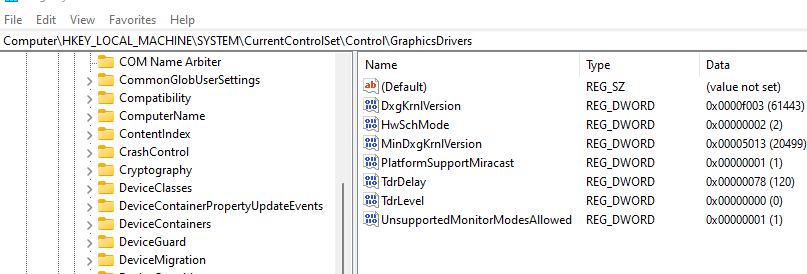
The lighting compiler runs on the GPU and can take a long time. This may cause the OS and/or graphics driver to abort the compilation process. You can disable this behavior by editing the registry and setting TdrLevel to 0.
Computer\HKEY_LOCAL_MACHINE\SYSTEM\CurrentControlSet\Control\GraphicsDrivers
Add a DWORD key named TdrLevel and set the value to 0.
Compiling a map is done through the test_mapbuilder.py script in tfmodels. The uncompiled map files (.vmf) are in tfmodels/src/levels.
To compile 2Fort:
cd %PLAYER%
cta tf
tfmodels\src\devscripts\test_mapbuilder.py tfmodels/src/levels/sdk_ctf_2fort.vmf ctf_2fort.bam -l -sa -j 12
This will take sdk_ctf_2fort.vmf, compile it, and output it to ctf_2fort.bam in the player folder. -l makes it compile lighting, -sa makes it compile Steam Audio reverb data. -j specifies the number of CPU threads to use. One other option is -r # which specifies the number of rays to use when calculating lighting. The default is 128, you can raise this number for higher quality but slower compile times, or lower the number of lower quality but faster compile times. -no-l and -no-sa will disable lighting and Steam Audio respectively.
After you've compiled the map, edit your local Config.prc and add this line.
tf-map ctf_2fort
The map should be the name of the map file without the .bam extension. Restart the server and client.