Let's get started. Files like these are important in repositories. This is where experiment purposes or repo specifications are stated.
For coding club purrposes (lol), please be aware of the following in order to keep a clean repo and avoid any branch overwriting
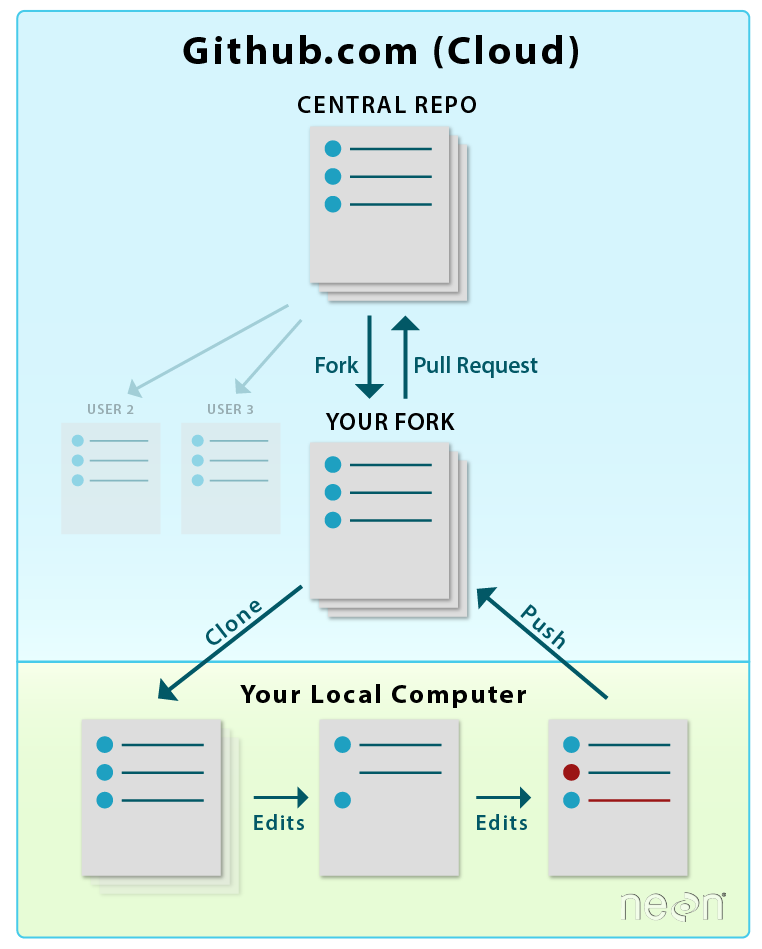
1.) Fork this repository into your own personal branch
        "A fork is a new repository that shares code and visibility settings with the original “up-stream” repository.
        Forks are often used to iterate on ideas or changes before they are proposed back to the upstream repository,
        such as in open source projects or when a user does not have write access to the upstream repository."
*Do not clone the main repo. Forking it will allow for changes to your own repo that do not affect the main
2.) Once the repo is forked, enter the project under your profile in GitHub & click the green "<> Code" icon
3.) Copy the HTTPS link provided
4.) Open the Anaconda terminal
5.) Use command 'cd' to ensure you are in the desired file path (or current directory)
6.) Enter
git clone https://URL-GITHUB-GAVE-YOU
7.) You now have the updated files on your local directory!
1.) Open the terminal
2.) Enter the desired cd path
3.) Enter
git add .
*This will populate all files changed in the directory that are to be sent to your forked branch
4.) Enter
git commit -m "Message describing the nature of your changes or additions"
5.) Enter
git push
*This sends the gathered files to the GitHub 'cloud' server
For a visualization: https://www.earthdatascience.org/images/earth-analytics/git-version-control/git-fork-clone-flow.png
1.) First, make sure you have gone through adding and pushing your changes to your fork before getting parent updates
2.) To check what branch you're in, Enter:
git remote -v
3.) To access the parent branch, Enter:
git fetch upstream
4.) Integrate changes, Enter:
git merge upstream/master
5.) New files will be added to your local folder and should enumerate with updated changes
https://git-scm.com/downloads Go ahead and download the Standalone 64-bit package compatible to your device (Mac/Windows)