Origami CAPTCHA is a self-hosted, zero-JavaScript "Drag The Item" CAPTCHA authorization provider written in Go. Users solve a responsive visual puzzle by moving two origami objects onto their matching upright outlines.
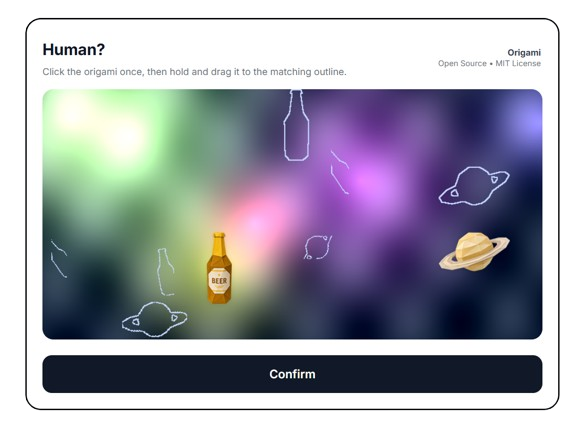
Origami CAPTCHA is designed for environments where client-side JavaScript is unavailable, unwanted, or deliberately disabled.
- Tor Browser users running NoScript or higher security modes that disable JavaScript.
- Privacy-focused deployments that want a CAPTCHA option without third-party scripts, tracking widgets, or browser-side behavioral collection.
- Accessibility and compatibility fallback.
- Additional CAPTCHA variation for Tor environments
The interaction uses native HTML form controls and CSS while the server keeps all challenge state:
- Each origami piece is a
<label>connected to a hidden radio input. Clicking or tapping the piece selects it without JavaScript. - CSS uses the selected radio's
:checkedstate to change the cursor into that origami piece. - A transparent
<input type="image">covers the challenge canvas. While it is active, CSS hides the original piece, creating the visual effect of picking it up and dragging it. - When the user releases or taps the canvas, the browser natively submits
pick.xandpick.ycoordinates to/c/{challenge_id}. - The server stores the submitted position and renders the updated challenge page. No position or solution state is stored in browser JavaScript.
- Pressing Confirm sends a normal form POST to
/verify. The server checks whether both submitted coordinates are close enough to their matching upright outlines.
The essential browser behavior is provided by:
<input type="radio" name="active" id="choice-item">
<label for="choice-item">...</label>
<input type="image" name="pick" formaction="/c/CHALLENGE_ID" formmethod="get">
An image input automatically submits coordinates as pick.x and pick.y, which makes the server-driven drag interaction possible without executable client-side code.
The desktop drag effect depends on a mouse cursor that can visually become the selected origami piece. Touch devices do not have that cursor, so a true drag effect is not available without client-side JavaScript. On mobile, the challenge intentionally uses a tap-to-place flow instead: tap an origami piece to select it, then tap its matching outline to submit the placement coordinates.
Requirements:
- Go 1.26 or newer
- The included
assets/origamidirectory
For a standalone development challenge:
go run ./srcThen open http://localhost:3000/captcha.
The bundled form example is enabled by default:
go run ./srcThen open http://localhost:3000/example. Set ENABLE_DEMO=false to disable the standalone /captcha challenge and all /example form routes. Registered applications can still use /authorize.
For a single registered application:
export CAPTCHA_CLIENT_ID="local-app"
export CAPTCHA_VERIFY_SECRET="replace-with-a-long-random-secret"
export CAPTCHA_REDIRECT_URIS="http://localhost:8080/captcha/callback"
go run ./src
For registered application configuration, use CAPTCHA_CLIENTS_JSON or CAPTCHA_CLIENTS_FILE as described in docs.md.
Build a binary:
go build -buildvcs=false -o origami ./srcSee docs.md for client registration, the authorization flow, endpoint contracts, response formats, integration examples, security, and deployment notes.

If you like cats and want to treat one to a meal, a little XMR would make a very happy kitty:
86Fu2JZaRoJKkBXsbbKSBT4FTVTZuQkGUgPGW5hm4rEDjJtRrKwNvWj1LkVNYtJjoMYiz8LRWpZGQ8CB2YUMm3h4Dm9zreJ