An iPad/iPhone app for creating, editing, assembling, and running Intel 8080 assembly code - including a working CP/M 2.2 operating system!
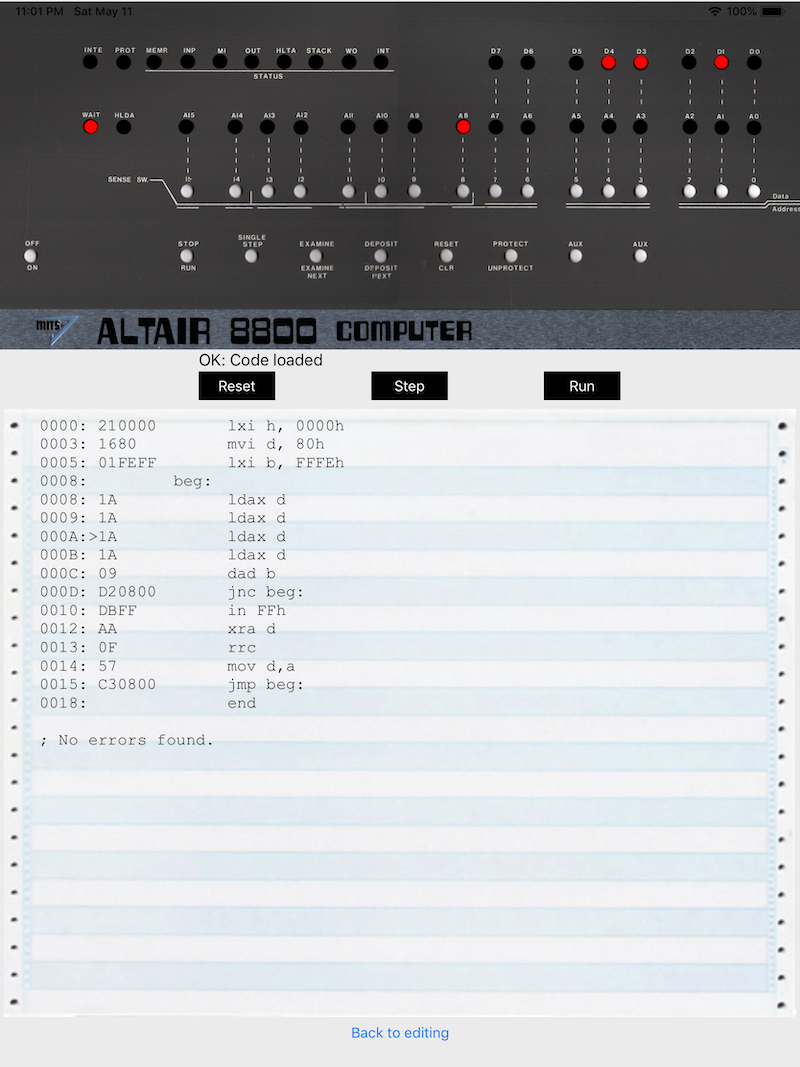
- ✅ Complete instruction set support
- ✅ Directives:
ORG,DB,DS,DW,EQU,END - ✅ String literals in DB:
db 'Hello World', 0Dh, 0Ah, '$' - ✅ Character literals:
cpi 'D',mvi a, '?' - ✅ Labels and forward references
- ✅ Multi-value DB directives
- ✅ Hex, octal, binary, and decimal number formats
- ✅ Regex-based tokenization with label protection
- ✅ Full 8080 instruction set
- ✅ All flags (carry, zero, sign, parity, aux carry)
- ✅ Stack operations
- ✅ Interrupts
- ✅ I/O ports (IN/OUT instructions)
- ✅ Visual step-through debugging
- ✅ Register inspection
- ✅ BDOS (Basic Disk Operating System) - Fully implemented in C
- Console I/O (functions 1, 2, 9, 10, 11)
- Disk operations (functions 13, 14, 25, 26)
- File operations (functions 15-23)
- Open, Close, Make, Delete, Rename
- Sequential Read/Write
- Search First/Next (directory listing)
- ✅ Disk Emulation
- 2 disk drives (A: and B:)
- 256KB each (77 tracks × 26 sectors × 128 bytes)
- Real CP/M directory structure
- Sample files pre-loaded (WELCOME.TXT, HELP.TXT, README.TXT)
- ✅ CP/M Terminal Interface
- Full-screen interactive terminal
- Keyboard input with CP/M control characters
- Character echo
- Scrolling output
- ✅ BIOS Support (via I/O ports 0xF0-0xFA)
- Console I/O
- Disk I/O
- Ready for real CP/M binaries
- Kill the Bit - Classic Altair 8800 game
- Echo Test - CP/M console I/O test
- Disk Test - CP/M disk read/write test
- File Operations - Create, write, read files
- Directory Operations - Search, rename, delete
- Command Processor Demo - Full DIR, TYPE, ERA, REN commands
- CP/M Boot Loader - Interactive command prompt with DIR and EXIT
- ✅ Added string literal support in DB directives
- Preserves strings during tokenization
- Handles quoted strings with spaces
- Mixed numeric and string values:
db 'Text', 0Dh, 0Ah, 24h
- ✅ Added character literal support for instructions
cpi 'D'automatically converts tocpi 44h(ASCII value)- Works in all instructions that take immediate values
- ✅ Fixed tokenizer to preserve quoted strings
- No longer splits
'Hello World'into separate tokens
- No longer splits
- ✅ Added "Run" button to execute assembled programs in CP/M Terminal
- ✅ Sample cycling includes new CP/M Boot program
- ✅ Automatic assembly on sample load
- ✅
CPM_IMPLEMENTATION_GUIDE.md- Complete CP/M implementation details - ✅
CPM_QUICKSTART_GUIDE.md- Getting started with CP/M - ✅
CPM_BOOT_READY.md- Testing the CP/M boot program - ✅ Assembly source files:
cpm_bios.asm,cpm_ccp.asm,cpm_boot.asm
⚠️ DB string assembly - PARTIALLY WORKING- ✅ First DB string on a line assembles correctly
- ❌ Second DB string fails (possibly comma-related)
- Example working:
db 'CP/M 2.2 CORE8080 EDITION', 0Dh, 0Ah✅ - Example failing:
db 'Type DIR to see files, EXIT to quit', 0Dh, 0Ah, '$'❌ - Issue: Commas inside strings may confuse the DB handler's comma-splitting
- Workaround: Use multiple DB lines or avoid commas in strings
- ✅ String literals now preserve spaces/colons (fixed)
⚠️ Label arithmetic not supported (label+1)- Must use pointer arithmetic instead
⚠️ Need to test the CP/M Boot interactive prompt⚠️ Directory listing prints extra bytes/NULs after filenames⚠️ No disk persistence yet (changes lost on restart)
- Fix DB comma-in-string bug 🔥 CURRENT ISSUE
- The DB handler splits on commas, breaking strings with commas
- Line 315 in Assemble.swift:
let values = code[opCounter].components(separatedBy: ",") - Need to split on commas ONLY outside of quoted strings
- Solution: Write a custom comma-splitter that respects quotes
- Test case:
db 'files, EXIT'should stay as one value
- Test CP/M Boot program
- Once DB strings work, assemble should succeed
- Run in terminal
- Type DIR command
- Verify file listing works
- Clean up directory display
- Remove drive byte from filename display
- Format 8.3 names properly
- Disk Persistence
- Save disk images to iOS Documents folder
- Load/save disk images
- Import/export individual files
- More CP/M Commands
- TYPE filename (display file contents)
- ERA filename (delete with confirmation)
- REN oldname newname (rename files)
- STAT (disk statistics)
- Better Terminal UI
- Clear screen button
- Copy/paste support
- Font size adjustment
- Color schemes
- Load Real CP/M Binaries
- Download CCP.COM and BDOS.COM from Archive.org
- Use authentic CP/M 2.2 instead of custom implementation
- Load BIOS from
cpm_bios.asm
- Run CP/M Software
- Load .COM files from iOS
- WordStar, dBase, Zork, etc.
- CP/M games and utilities
- Complete BDOS
- Random file access (functions 33-40)
- User areas (0-15)
- File attributes
- Timestamps
- CP/M 3.0 Support
- Banked memory
- Date/time stamps
- Extended BDOS functions
- Z80 CPU Emulation
- Add Z80 instructions
- Run Z80 CP/M software
- Networking
- Serial port emulation
- Telnet BBS access
- File transfer (XMODEM, Kermit)
- Open the app
- Tap "Samples" repeatedly to cycle through programs
- Find "CP/M Boot Loader"
- Tap "Assemble" (should auto-assemble)
- Tap "Run" to launch CP/M Terminal
- Type commands:
DIR- List files on disk A:EXIT- Exit the program
- Create a new document or open existing .s file
- Write 8080 assembly code:
org 100h

start:
    lxi d, message
    mvi c, 09h          ; BDOS print string
    call 0005h          ; Call BDOS
    hlt

message:
    db 'Hello, CP/M!', 0Dh, 0Ah, '$'

end- Tap "Assemble"
- Check for errors in the assembled code view
- Tap "Run" to execute in CP/M Terminal
- Or tap "Emulate" to step through instructions
- After assembling, tap "Emulate"
- Tap "STEP" to execute one instruction
- Watch registers update in the display
- See program counter highlighted in source code
- Monitor flags (carry, zero, sign, etc.)
Core8080Manager/
├── Document Browser/
│   ├── 8080.c                 # CPU emulator & CP/M BDOS
│   ├── 8080.h                 # CPU definitions
│   ├── Assemble.swift         # 8080 assembler
│   ├── CPMTerminalViewController.swift  # CP/M terminal UI
│   ├── TextDocumentViewController.swift # Main editor
│   └── EmulatorViewController.swift     # Step-through debugger
├── cpm_bios.asm              # CP/M BIOS (assembly source)
├── cpm_ccp.asm               # CP/M CCP (assembly source)
├── cpm_boot.asm              # Simple boot loader
└── Documentation/
    ├── CPM_IMPLEMENTATION_GUIDE.md
    ├── CPM_QUICKSTART_GUIDE.md
    └── CPM_BOOT_READY.md
0x0000-0x00FF : Page Zero (vectors, buffers)
0x0005        : BDOS entry point
0x0080-0x00FF : Default DMA buffer
0x0100-0xDBFF : TPA (Transient Program Area) - User programs
0xDC00-0xE3FF : CCP (Console Command Processor) - 2KB
0xE400-0xF9FF : BDOS (Basic Disk OS) - 5.5KB
0xFA00-0xFFFF : BIOS (Basic I/O System) - 1.5KB
BDOS/Legacy Ports:
0x00- Console status0x01- Console data0x10- Disk select0x11- Track number0x12- Sector number0x13- DMA address low0x14- DMA address high0x15- Disk operation
BIOS Ports (0xF0-0xFA):
0xF0- Console status (CONST)0xF1- Console input (CONIN)0xF2- Console output (CONOUT)0xF3- Disk select (SELDSK)0xF4- Set track (SETTRK)0xF5- Set sector (SETSEC)0xF6- DMA address low (SETDMA)0xF7- DMA address high0xF8- Read sector (READ)0xF9- Write sector (WRITE)0xFA- Home disk (HOME)
- CP/M 2.2 Binaries on Archive.org
- CP/M 2.2 Source Code
- Digital Research Source Code
- CPMish - Open Source CP/M
- Original 8080Core by GrantMeStrength
- CPU Emulator based on i8080-emu by cbrooks90
- CP/M 2.2 by Digital Research (now public domain)
- Kill the Bit game by Dean McDaniel (1975)
See LICENSE folder for details. CP/M is public domain. Original 8080 emulator code used with attribution.
This project aims to:
- Educate - Learn 8080 assembly language and CP/M operating system concepts
- Preserve - Keep 1970s computing history alive and accessible
- Experiment - Explore retro computing on modern iOS devices
- Inspire - Show how simple yet powerful early computers were
Status: Active development. CP/M system is functional but needs polish and testing.
Last Updated: January 2026
- Check that DB strings use single quotes:
'text'not"text" - Character literals need quotes:
cpi 'D'notcpi D - Labels must end with colon:
loop:notloop - Hex numbers need 'h':
0Dhor0DH - No label arithmetic: Use
inx hinstead oflxi h, label+1
- Make sure code assembled successfully (check for "Error" in output)
- Look for hex output in assembled view
- Try the "CP/M Terminal" button (loads built-in shell)
- Check Xcode console for error messages
- Files should be created automatically by
cpm_init() - Check Xcode console for "CP/M System Initialized" message
- Make sure BDOS functions 17/18 (Search First/Next) are working
- Verify disk initialization in
cpm_disk_init()
Happy Retro Computing! 🖥️✨