Bug description
Fields inside a narrow Group fieldtype can overflow the group's assigned width and extend outside the surrounding publish form or Bard set.
For example, place a textarea at 75% width beside a borderless Group at 25% width, with two full-width Select fields inside the group. The select controls should stack within the group's 25% column. Instead, their rendered width can be much larger than the group.
This was first observed inside a Bard set. The same overflow is reproducible with the core Group and Publish components in isolation, without addons or custom Control Panel CSS.
Screenshot
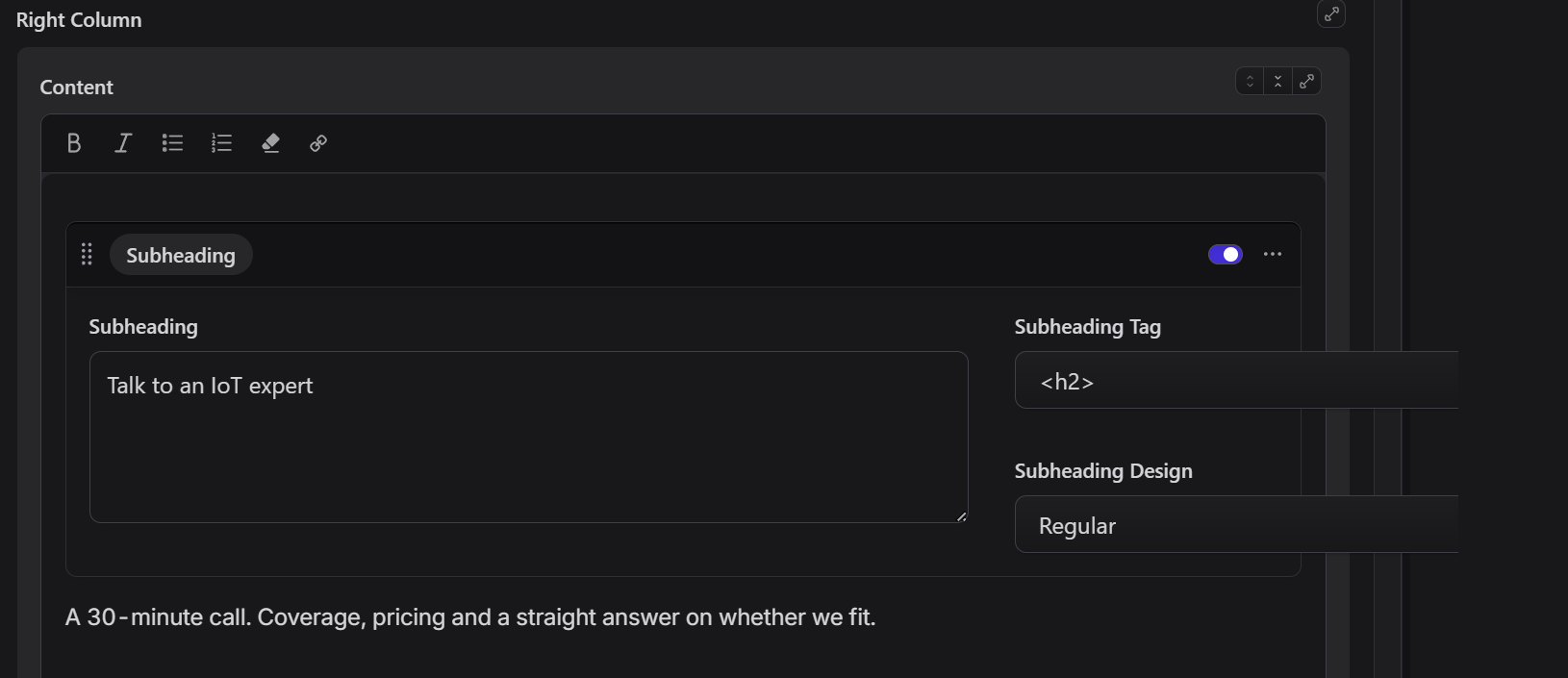
The two select controls extend beyond the 25% Group and the surrounding Bard set.
How to reproduce
- Add the following fields to a collection blueprint, or use the same fields inside a Bard set.
- Open an entry in the Control Panel at desktop width, so the fields appear side by side.
- Observe that the two select controls extend beyond the right edge of the Options group. Resize the publish panel to see the overflow change.
title: Group layout reproduction
tabs:
  main:
    display: Main
    sections:
      - fields:
          - handle: heading
            field:
              type: textarea
              display: Heading
              width: 75
          - handle: options
            field:
              type: group
              display: Options
              width: 25
              hide_display: true
              border: false
              fields:
                - handle: tag
                  field:
                    type: select
                    display: Tag
                    default: h2
                    options:
                      h2: H2
                      h3: H3
                - handle: style
                  field:
                    type: select
                    display: Style
                    default: regular
                    options:
                      regular: Regular
                      small: Small
Expected: both controls stay within the group and stack vertically.
Actual: the controls overflow the group. Text fields reproduce the same layout problem, so it is not specific to Select.
Logs
No relevant server logs. This is a Control Panel layout issue.
Environment
Relevant version information from php please support:details is below. Site-specific configuration and addon information have been omitted for privacy; the isolated reproduction uses only core components and core styles.
Laravel Version: 13.30.1
PHP Version: 8.4.20
Composer Version: 2.9.5
Statamic Version: 6.31.0 PRO
Also reproduced in Chromium against the current 6.x source at a2a01578d.
Installation
Other: existing Statamic installation. Independently reproduced using the core publish components in a browser test within the CMS repository.
Additional details
The group's inner .publish-fields grid always has 12 tracks, and its responsive field widths and gaps are based on the enclosing panel container rather than the narrow group. At the large-panel breakpoint, the 11 horizontal gaps alone require 352px. A group narrower than that cannot contain the grid.
A proposed fix is to give each Group its own named panel container, use one grid track below the existing breakpoint, and reset inherited column spans at each nested publish grid. Wide groups can then retain their configured multi-column layouts, while narrow groups stack their fields.
Bug description
Fields inside a narrow Group fieldtype can overflow the group's assigned width and extend outside the surrounding publish form or Bard set.
For example, place a textarea at 75% width beside a borderless Group at 25% width, with two full-width Select fields inside the group. The select controls should stack within the group's 25% column. Instead, their rendered width can be much larger than the group.
This was first observed inside a Bard set. The same overflow is reproducible with the core Group and Publish components in isolation, without addons or custom Control Panel CSS.
Screenshot
The two select controls extend beyond the 25% Group and the surrounding Bard set.
How to reproduce
Expected: both controls stay within the group and stack vertically.
Actual: the controls overflow the group. Text fields reproduce the same layout problem, so it is not specific to Select.
Logs
No relevant server logs. This is a Control Panel layout issue.
Environment
Relevant version information from
php please support:detailsis below. Site-specific configuration and addon information have been omitted for privacy; the isolated reproduction uses only core components and core styles.Also reproduced in Chromium against the current
6.xsource ata2a01578d.Installation
Other: existing Statamic installation. Independently reproduced using the core publish components in a browser test within the CMS repository.
Additional details
The group's inner
.publish-fieldsgrid always has 12 tracks, and its responsive field widths and gaps are based on the enclosingpanelcontainer rather than the narrow group. At the large-panel breakpoint, the 11 horizontal gaps alone require 352px. A group narrower than that cannot contain the grid.A proposed fix is to give each Group its own named
panelcontainer, use one grid track below the existing breakpoint, and reset inherited column spans at each nested publish grid. Wide groups can then retain their configured multi-column layouts, while narrow groups stack their fields.