

-
|
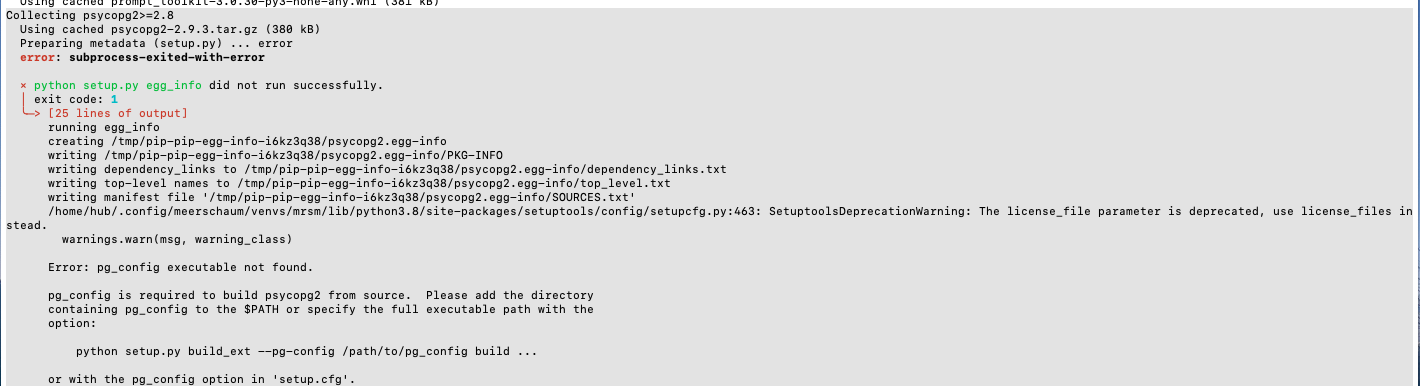
Hello. I am installing mrsm on a fresh VM. I have docker installed and confirmed that the service/daemon is running. When trying to run "stack up up -d db" I get the following error: " 💢 Failed to connect to the Docker engine." When running "mrsm sql" there is a an error related to psycopg2 install. See the screen grab below. My Linux OS: Docker version 20.10.12, build 20.10.12-0ubuntu2~20.04.1 |
Beta Was this translation helpful? Give feedback.
Replies: 2 comments

-
|
Hi @whitedl, the interactive SQL CLI needs the PostgreSQL driver installed (instead of the automatically installed binary one). On Ubuntu, install the sudo apt update && sudo apt install libpq5 libpq-dev -yFor the Docker issue: is your user in the I hope this helps! |
Beta Was this translation helpful? Give feedback.
-
|
It was probably the docker group issue causing the connection error. Removed docker added the #USER and uninstalled meerschaum and installed all again. That seemed to take care of the issue.
…________________________________
From: Bennett Meares ***@***.***>
Sent: Monday, June 27, 2022 3:26 PM
To: bmeares/Meerschaum ***@***.***>
Cc: David White ***@***.***>; Mention ***@***.***>
Subject: Re: [bmeares/Meerschaum] psycopg2 install error (Discussion #64)
Hi @whitedl<https://urldefense.com/v3/__https://github.com/whitedl__;!!PTd7Sdtyuw!TF86Fj8RopIjUzmP2g6zXY1un2Zc3AWDATy7-DTfJ6Q8Af_NITi2ooJ4CT95YFF45JuhDeYMZuhlhUDMhHBARYVBcWM$>, the interactive SQL CLI needs the PostgreSQL driver installed (instead of the automatically installed binary one). On Ubuntu, install the libpq5 and libpq-dev packages:
sudo apt update && sudo apt install libpq5 libpq-dev -y
For the Docker issue: is your user in the docker group? It sounds like the daemon is running, but your account doesn't have privileges. You can add your user to the group with usermod:
sudo usermod -aG docker whitedl
I hope this helps!
—
Reply to this email directly, view it on GitHub<https://urldefense.com/v3/__https://github.com/bmeares/Meerschaum/discussions/64*discussioncomment-3034088__;Iw!!PTd7Sdtyuw!TF86Fj8RopIjUzmP2g6zXY1un2Zc3AWDATy7-DTfJ6Q8Af_NITi2ooJ4CT95YFF45JuhDeYMZuhlhUDMhHBAEWcnHdI$>, or unsubscribe<https://urldefense.com/v3/__https://github.com/notifications/unsubscribe-auth/AB5EITIOOGKA7PEETOFLV63VRH55ZANCNFSM5Z7QXMJQ__;!!PTd7Sdtyuw!TF86Fj8RopIjUzmP2g6zXY1un2Zc3AWDATy7-DTfJ6Q8Af_NITi2ooJ4CT95YFF45JuhDeYMZuhlhUDMhHBAKu7s-5I$>.
You are receiving this because you were mentioned.Message ID: ***@***.***>
|
Beta Was this translation helpful? Give feedback.


Hi @whitedl, the interactive SQL CLI needs the PostgreSQL driver installed (instead of the automatically installed binary one). On Ubuntu, install the
libpq5andlibpq-devpackages:sudo apt update && sudo apt install libpq5 libpq-dev -yFor the Docker issue: is your user in the
dockergroup? It sounds like the daemon is running, but your account doesn't have privileges. You can add your user to the group withusermod:I hope this helps!