Description
This extension adds wind swaying ability and optional GPU instancing to 3D objects (trees, grass, bushes) with frustum and distance culling.

Features:
- Real-time foliage wind animation for 3D scenes
- Multiple sway types: Grass, Bush, Tree Trunk (dead tree), and Tree Leaves (more coming soon)
- Works with both regular meshes and GPU-instanced foliage for better performance
- Global wind controls:
strength, speed, and wind direction
- Optional gust system with texture-driven gust masks
- Optional visual tuning: gradient tint, saturation/contrast, PBR tweaks
- Distance-based fading/culling for better performance
- Automatic foliage shader/material patching (including shadow materials)
- Runtime-safe live updates for wind/gust parameters
- Scene/object cleanup logic to reduce memory leaks and stale resources
Comes with:
- Foliage swaying behavior — sets parameters for individual 3D foliage object (grass, tree, bush)
- Wind sway actions — sets/updates wind parameters (optional)
- Wind gust actions — sets/updates wind gust parameters (optional)
How to use the extension:
-
Import your 3D object (tree, bush, grass...) and add the Foliage swaying behavior to it.
-
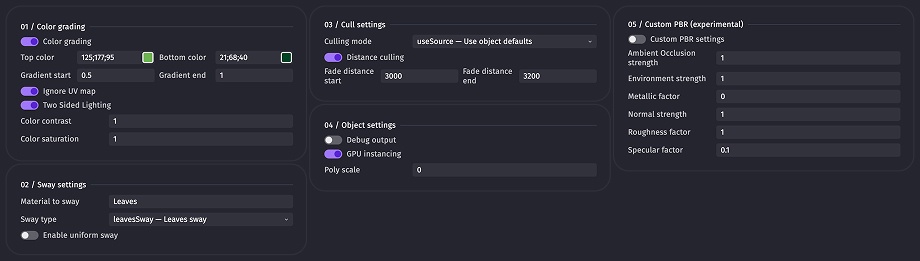
Choose from various object settings and parameters, then add the object to your scene.
-
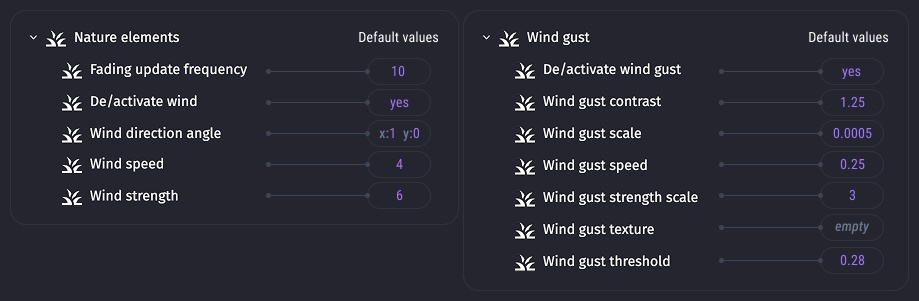
Optionally set general wind and gust parameters at the beginning of the scene. If not, default values will be used.
-
Play your scene.
Current limitations, issues, and guidelins:
-
Collision is not yet supported for GPU instanced objects but is planned.
-
The mesh complexity auto-detection (Polyscale parameter) is not perfect and can produce inconsistent sway intensity across assets. If you encounter overly strong or weak sways, experiment with the Polyscale value to make your asset's sway consistent. Use the debug option to find the auto-selected value, then increase or decrease it.
-
Foliage material auto-detection works well and can usually be left empty, but there are edge cases with multi-material objects. If you don't have access to the source file of your 3D object, you can find your object's material name using the debug option in object's Foliage swaying behavior.
-
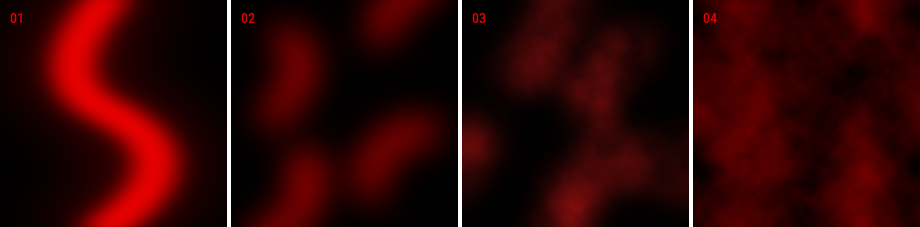
The optional wind gust texture can create natural-looking gusts and is worth creating. If not, one will be automatically created. To make one yourself, use only black and red colors (black will be ignored and red will be the actual gust map). For the best results, create a tileable 512x512 image or download one of the examples below. 01 / 02 / 03 / 04
-
Hot reload supports all basic behavior property changes, excluding Sway settings (Material to sway, Sway type, Enable uniform sway toggle) and Distance culling, Debug output, GPU instancing, and Custom PBR settings toggles. However, if PBR settings are enabled as you start the preview, changes to specific PBR values will be updated on hot-reload.
Future nice-to-haves:
- More swaying types
- Polygon-based foliage scattering
- Collision for instanced objects
- Split camera culling vs shadow caster culling to avoid frustum edge cases (mostly early shadow pop-outs for instanced objects)
- Rewrite shader swaying logic to eliminate
PolyScale completely
- Basic LOD system
- Further optimize shader math
Checklist
Example file
NatureElementsDemo.zip
Extension file
NatureElements.zip 1.0.4

Description
This extension adds wind swaying ability and optional GPU instancing to 3D objects (trees, grass, bushes) with frustum and distance culling.
Features:
strength,speed, andwind directionComes with:
How to use the extension:
Import your 3D object (tree, bush, grass...) and add the Foliage swaying behavior to it.
Choose from various object settings and parameters, then add the object to your scene.

Optionally set general wind and gust parameters at the beginning of the scene. If not, default values will be used.

Play your scene.
Current limitations, issues, and guidelins:
Collision is not yet supported for GPU instanced objects but is planned.
The mesh complexity auto-detection (
Polyscaleparameter) is not perfect and can produce inconsistent sway intensity across assets. If you encounter overly strong or weak sways, experiment with thePolyscalevalue to make your asset's sway consistent. Use the debug option to find the auto-selected value, then increase or decrease it.Foliage material auto-detection works well and can usually be left empty, but there are edge cases with multi-material objects. If you don't have access to the source file of your 3D object, you can find your object's material name using the debug option in object's Foliage swaying behavior.
The optional wind gust texture can create natural-looking gusts and is worth creating. If not, one will be automatically created. To make one yourself, use only black and red colors (black will be ignored and red will be the actual gust map). For the best results, create a tileable 512x512 image or download one of the examples below. 01 / 02 / 03 / 04

Hot reload supports all basic behavior property changes, excluding Sway settings (
Material to sway,Sway type,Enable uniform sway toggle) andDistance culling,Debug output,GPU instancing, andCustom PBR settingstoggles. However, if PBR settings are enabled as you start the preview, changes to specific PBR values will be updated on hot-reload.Future nice-to-haves:
PolyScalecompletelyChecklist
Example file
NatureElementsDemo.zip
Extension file
NatureElements.zip 1.0.4